Improving Extraction Accuracy with AI Parsing When Scanned PDF OCR Fails
Have you ever extracted a document with OCR only to find that table structures disappeared or the reading order of multi-column reports became scrambled, rendering the output unusable for your system? While internal documents accumulate rapidly, processing often gets delayed during the document extraction stage, which is the initial phase of automation pipelines. This article summarizes the core aspects of document preprocessing, from the structural limitations of traditional OCR to AI parsing.
Why Does Traditional OCR Fall Short for Scanned Document Parsing?
Scanned documents frequently cause delays in the early stages of business automation because traditional OCR recognizes character shapes but fails to recognize document structures. In multi-column layouts or tables, the reading order and row/column structures are often damaged, making the text unusable for business operations even if characters are accurately recognized.
What Is OCR? Practical Use Cases from Daily Life to Corporate Workflows
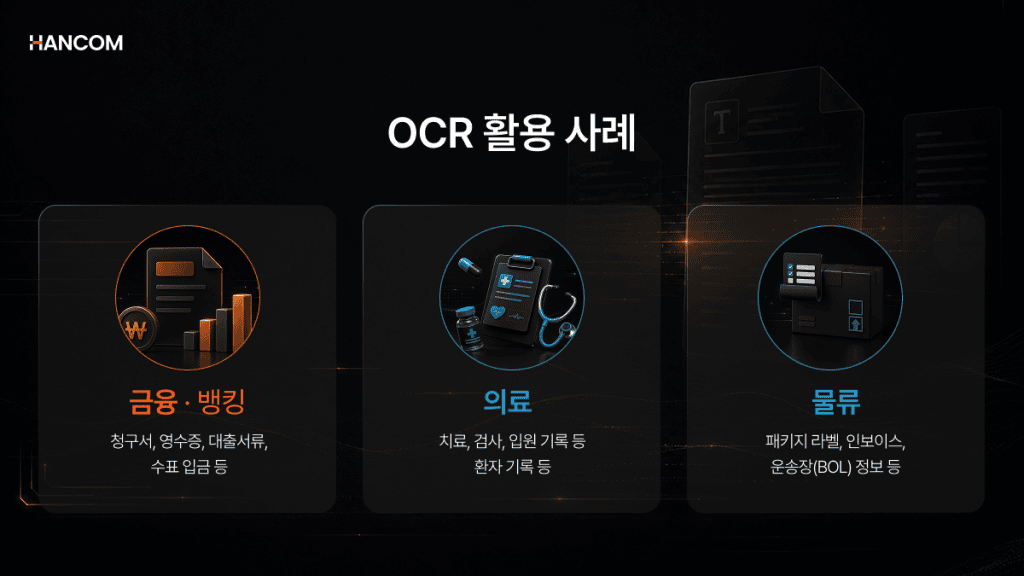
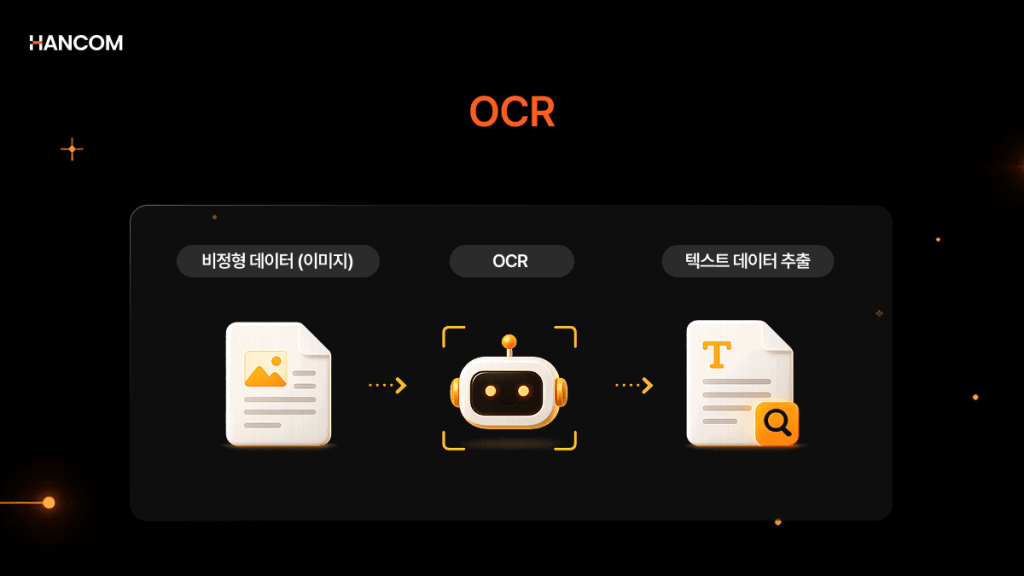
OCR (Optical Character Recognition) is a technology that enables computers to read text within images or scanned documents and convert it into editable, searchable text.
OCR is already widely used in everyday life. You have likely experienced remote identity verification when signing up for a banking app. A prime example of OCR utilization is identity verification where your name and resident registration number are automatically populated after photographing your ID card. In enterprise environments, it is also used to scan receipts and transaction statements for automatic entry into accounting systems, or to convert contracts into digital, searchable formats for archival.
👉 Curious to learn more about the basic concepts of OCR? You can find out in [What is OCR? AI OCR Document Automation Guide].
Enterprise Workflow Automation Trends and the Bottleneck of Unstructured Document Processing
Many enterprises are pursuing AX (AI Transformation) by adopting RPA (Robotic Process Automation), document automation, and AI-driven business systems.
However, in practice, even with the adoption of automation tools, bottlenecks frequently occur at the extraction stage, where unstructured documents must be converted into data that systems can process.
Data used in enterprise operations often consists of unstructured data with inconsistent formats, such as documents, images, and scanned PDFs. VentureBeat has previously cited a report projecting that approximately 80% of the global datasphere in 2025 will be unstructured data.
In such environments, image-based PDFs generated by copiers or fax machines, and scanned documents lacking text layers, can become automation bottlenecks because systems cannot read them directly.
If the necessary information cannot be reliably extracted from documents, subsequent stages—RPA, document automation, AI search and analysis—are likely to require repeated manual verification.
How OCR Works and the Technical Limitations of Simple Text Extraction
While OCR is often valued for high recognition rates, what matters more in workflow automation is structural integrity—preserving the original layout.
OCR extracts text data through a sequence of image preprocessing (correcting tilt and noise), character recognition (pattern matching and feature extraction), and post-processing.
However, reading characters alone is insufficient for document automation. When a two-column report is extracted, text from both sides becomes intermingled; in tables, row and column distinctions vanish, leaving numbers listed without meaning. This limitation has grown more pronounced in light of recent trends. As demand increases for building LLMs and RAG systems in-house—without sending internal documents externally—the importance of AI OCR and document parsing at the front end has also risen.
The Core of Internal Document Automation Accuracy: What Is AI Parsing?
Unlike simple text extraction, AI parsing is a technology that analyzes document objects such as paragraphs, tables, and images, and reconstructs them into data that preserves the original structure. The accuracy of internal document automation hinges not on the extraction method, but on how well the structure is preserved.
Limitations of Simple Text Extraction in Scanned PDF Conversion
The root cause lies in how PDFs are created. PDFs generated as electronic documents from the outset often store text objects alongside images and graphic information, enabling search and copy functions. In contrast, scanned PDFs created by fax or copier typically store each page as a single image, often without embedded text information.
In such cases, the system must treat the document as an image file rather than a text-bearing file. Because character positions, reading order, and the row-column structure of tables are not provided as source data, they must be re-estimated through OCR and layout analysis. The more complex the document—mixing tables and charts—the greater the likelihood of extraction errors during this process.
Limitations of Simple Text Extraction
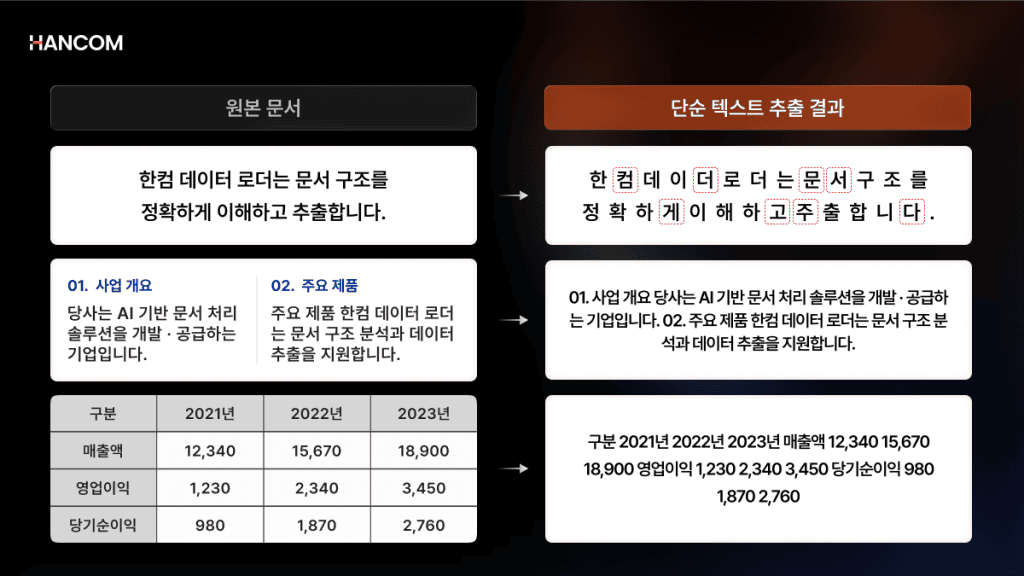
- Text corruption: Depending on scan quality and resolution, consonants and vowels may separate, or numerous typos may occur.
- Layout collapse: When multi-column reports or continuous text are extracted, the boundary between left and right columns breaks down, merging into a single long line.
- Table data distortion: Numbers within tables are strung together in a single line without row or column distinctions, severing the connection between values and their corresponding items.
What Is AI Parsing? A Structure-Preserving Parser, Unlike Simple Text Extraction
AI parsing is a technology that goes beyond extracting characters alone; it analyzes the structure and relationships of paragraphs, tables, and images, and reconstructs them as data. While simple text extraction retrieves only character information, AI parsing can separate even merged tables into semantic units, preserving the original structure.
If table structure is lost during embedding, the connection between table titles and numerical data is severed, making it difficult for the LLM to distinguish which item a given value describes. Unrelated text clusters in the same vector space, degrading search quality and lowering answer accuracy. To produce data ready for direct input into RAG and LLM pipelines, structure preservation must be a prerequisite. Hancom Data Loader is a product that implements this preprocessing as a solution.
*Source: Microsoft Azure, “Document layout analysis”
*Source: Google Cloud, “Enterprise Document OCR”
Document Layout Analysis (DLA) and Table Structure Recognition (TSR) Technologies
The two pillars enabling AI parsing to interpret document structure are Document Layout Analysis (DLA) and Table Structure Recognition (TSR). If DLA establishes the skeleton of the entire page, TSR reconstructs the internal structure of tables—the most challenging element within.
DLA is a structural analysis technology that leverages AI deep learning to distinguish various elements within a document—text, images, tables, graphics—and accurately identify the position and role of each element. It determines which regions are titles and which are body text, and even analyzes the reading order in multi-column layouts. The extracted hierarchical information serves as the basis for semantic unit chunking in RAG pipelines, leading to improved search accuracy.
TSR is a technology that converts tables within images into structured data that machines can read. It identifies relationships between cells to reconstruct row and column structure, and can recognize complex table structures such as borderless tables, merged cells, and nested tables. The converted data is output in markdown, JSON, or HTML format at the cell, row, and column level, ready for immediate use without additional post-processing.
Structured Data for Data Integrity
For extracted data to be practically usable in systems, it must be organized in a machine-readable format and divided into semantic units.
Processing Structured and Semi-Structured Data for Automation Pipeline Integration
To integrate unstructured documents into business systems, they must first be processed into structured or semi-structured data that machines can read. While humans can visually perceive the position and context within a document, systems require clearly separated data—item names, values, table structures, paragraph hierarchies—to proceed with subsequent processing.
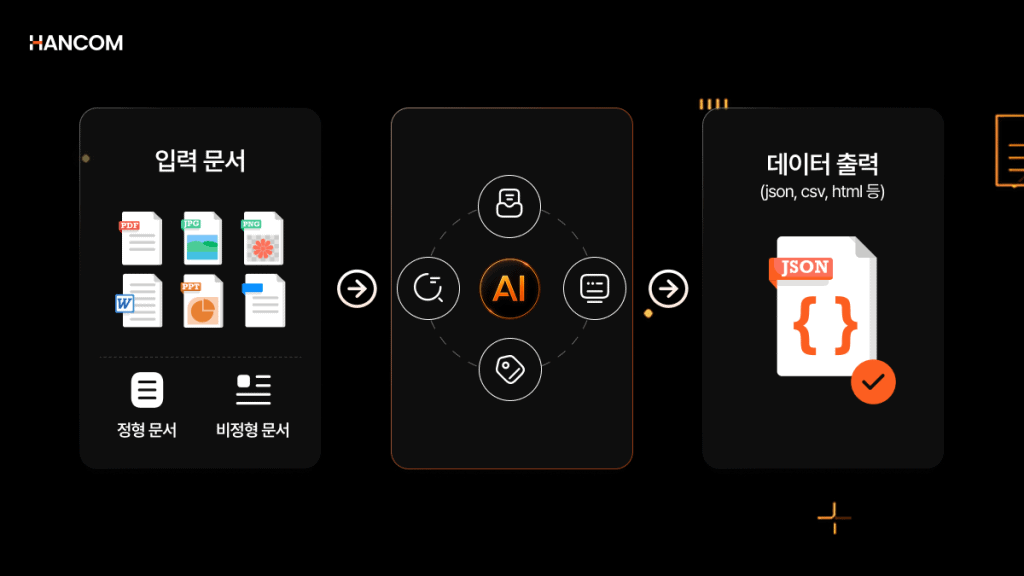
Data can be categorized by degree of organization into structured, semi-structured, and unstructured. Structured data has a fixed format of rows and columns, like tables or databases; semi-structured data has consistent format markers, like JSON or HTML. Unstructured data, by contrast, resembles formats without a fixed framework—continuous text, images, scanned documents.
Converting document extraction results into JSON, CSV, HTML, or markdown makes them easier to use as input data for other systems. Particularly in RPA, document automation, and RAG pipelines, extraction results must have a consistent structure to reduce errors during search, analysis, and subsequent integration processes.
👉 Curious about processing scope by format—HWP, HWPX, PDF, OOXML? See the [Data Loader Getting Started Guide] for supported formats and integration methods.
Source: AWS, “What is Intelligent Document Processing”
Semantic Unit Separation to Prevent Information Loss
Dividing documents by a fixed character count or byte threshold may appear to speed up processing. However, in actual business documents, cutting sentences, tables, or sections mid-stream can render them difficult to use for search.
| Category | Limitations |
| Character count basis | Sentences or tables may be cut mid-stream. |
| Token count basis | LLM input length is satisfied, but semantic units may be separated. |
| Semantic unit basis | Preserves the relationship between titles, body text, and tables, maintaining search context. |
In RAG pipelines, even when setting length-based parameters like chunk_size, it is essential to also consider structures where meaning flows continuously—such as titles with body text, or tables with explanatory sentences. If chunks lose context, the integrity of search results declines, and the likelihood that the LLM will generate answers based on incomplete evidence increases.
Chunking quality directly affects answer quality. If the LLM receives only incomplete chunks as evidence, it is more likely to misinterpret the document’s intent or generate factually incorrect answers. Therefore, in RAG preprocessing, what matters is not how finely text is divided, but how accurately it is divided into searchable semantic units.
Document Preprocessing Technology Stages Suited to Your Company’s Workflow Environment
If the goal is simply to convert documents into searchable text, OCR is sufficient. However, if the objective is to preserve table structure, hierarchical information, and semantic units—producing data ready for direct input into RAG pipelines or AI training datasets—AI parsing that interprets document structure is necessary.
Comparison table of preprocessing solutions by document type and data utilization purpose
OCR recognizes characters within images and converts them into text. AI parsing leverages computer vision and natural language processing to handle layout structure and reading order as well.
OCR vs. AI Parsing: Detailed Comparison by Category
| Comparison Item | OCR | AI Parsing (Document Structure Analysis) |
| Processing Target | Character shapes within images | All document objects: paragraphs, tables, images |
| Operational Method | Recognizes characters and lists them as continuous text | Reconstructs structure through layout analysis and table structure recognition |
| Table handling | Text scattered without row or column distinctions | Restores structure, including merged cells and multi-level headers |
| Reading Order | Left and right sides easily become intermingled in multi-column documents | Recognizes columns and hierarchy, maintaining original order |
| Output Format | Plain text | Structured data: JSON, HTML, markdown, etc. |
| Semantic Unit Preservation | Not preserved | Preserved by title, paragraph, and table unit |
| Suitable Documents | Simple documents with few or no tables | Unstructured documents mixing tables and images: reports, manuals, papers |
| Use Case | Simple text digitization | RAG construction, AI training data refinement |
For converting simple documents into text, OCR is sufficient. To input reports or contracts mixing tables and images into RAG pipelines, or to refine them as AI training data, document structure analysis that distinguishes the position and logical role of text, tables, and images must be a prerequisite.
The Starting Point of Accurate Enterprise Workflow Automation: Hancom Data Loader
Hancom Data Loader is a document structure analysis solution that converts HWP, HWPX, PDF, and OOXML documents into structured data that AI can utilize.
Hancom Data Loader: Converting Unstructured and Semi-Structured Data into AI-Friendly Metadata
Hancom Data Loader integrates DLA, OCR, and TSR into a single pipeline. It processes text, tables, images, and scanned originals in one pass, reducing errors that arise when connecting functions separately. It recognizes borderless tables and merged cells at the cell level, fully preserving table structure.
It also parses HWP and HWPX—formats with a high share in domestic business documents—directly from the original, without PDF conversion. For PDFs, it applies DLA, TSR, and OCR to convert them into JSON, CSV, or HTML format while maintaining layout and table structure. Available as an API SaaS for convenient use, it can also be deployed directly within internal networks as a container-based REST API in on-premise environments. This enables public, financial, and legal institutions—where external document transmission is strictly restricted—to safely utilize it as a preprocessing module for in-house RAG and LLM pipelines.
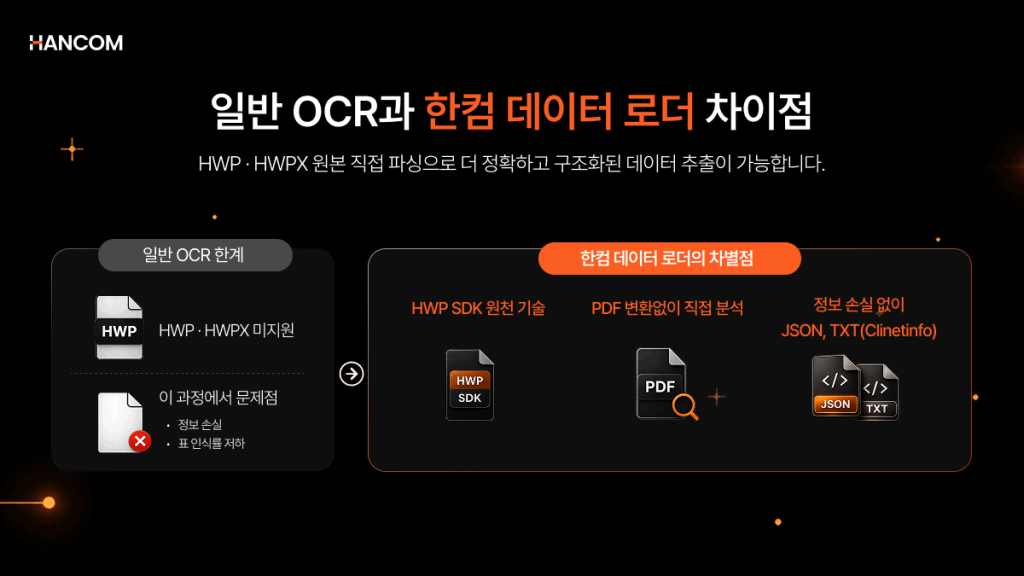
🖥️Hancom Data Loader
By integrating DLA, OCR, and TSR into a single pipeline, it converts HWP, HWPX, PDF, and OOXML documents into structured data ready for immediate AI use. Beyond simple text extraction, it preserves table structure and paragraph hierarchy, and the extracted data can be linked with Hancompedia to enable RAG search and answer generation. From scanned documents to AI parsing, start your document preprocessing with Hancom Data Loader.
👉 Go to Hancom Data Loader Live Demo
👉 Inquire about Hancom Data Loader implementation
References
- IBM, “What is optical character recognition (OCR)?”
- AWS, “What is OCR?”
- Microsoft Azure, “Document layout analysis”
- NVIDIA Developer, “PDF Data Extraction Approaches for Information Retrieval”
- Unstructured, “Chunking”