How to parse HWP and Word documents and convert them into structured data such as JSON
Parsing HWP documents and parsing Word documents (Document Parsing) are often the first challenges you face when trying to connect internal documents to RAG (Retrieval-Augmented Generation) or an LLM. HWP and Word files accumulated over decades preserve laws, policies, and business context as-is, but if you ingest the files without processing, structural information such as tables and footnotes can be damaged, leading to incorrect answers. As demand grows for using public documents as AI-ready source material, this article organizes, by format, how to accurately convert documents into structured data such as JSON.
Why accurate parsing matters for HWP and Word documents
Why inaccurate document parsing leads to inaccurate RAG answers
When errors occur during document parsing, RAG answers become inaccurate because if only the text is extracted while the document structure is damaged, the criteria for subsequent chunking (the step of splitting a document into pieces) also becomes misaligned, reducing retrieval accuracy and resulting in answers with weak or missing evidence.
Parsing HWP documents is particularly difficult because HWP and HWPX are not files that simply list characters. According to Hancom Tech’s analysis of the HWP format, HWP is a format that contains multiple folders and data bundles within a single file, so tables, footnotes, and paragraph hierarchies are stored separately in different locations. If you ignore this structure and extract only text, tables are mixed into a single line and footnotes disappear.
This lost structure directly degrades retrieval quality. In DLA (Document Layout Analysis) research, when documents were first split into meaningful regions before retrieval, text-based RAG accuracy increased by up to 9.4 points and RAG accuracy that also considers images increased by up to 10.4 points compared to the conventional approach without region segmentation. In other words, how well you preserve structure determines answer accuracy.

Requirements for accurate document parsing
Accurate document parsing requires three technologies to work together: DLA, TSR (Table Structure Recognition), and OCR (Optical Character Recognition).
DLA uses deep learning to distinguish text, images, tables, and graphics within a document and even determines the reading order. TSR restores relationships among table cells and rows/columns, and OCR converts text in scans or images into a machine-readable form. If OCR is the technology that reads “what is written,” parsing is the step that understands “how it is structured.”
If any one of the three is missing, results become unstable. A study summarizing document parsing technologies explains document parsing as either a modular approach that combines DLA with text/table/formula recognition, or an integrated model approach that jointly considers images and language. In either case, the common point is that reading structure and reading characters must happen together.
How to parse HWP/HWPX documents
How to extract text and table data from HWP files
The way to extract text and table data from HWP/HWPX files is to parse the original files directly—without converting to PDF—so that table structure, footnotes, and metadata are preserved as-is.
HWP is a CFB (Compound File Binary File Format) that contains multiple folders and files within a single file. In Hancom Tech’s Python HWP parsing example, version information, shared properties such as fonts, the main body content, and embedded images are stored separately in different locations. Each data block includes a tag indicating its type and size information, and most of it is stored compressed—so to make it machine-readable, you must unpack and interpret this structure step by step.
By parsing the original file directly, you can extract document property information in its original form. By contrast, if you convert to PDF first and then extract, table structure is damaged and text becomes intermingled. Direct parsing of the original is therefore a reliable way to reduce structural loss.
💡 Curious how HWP original parsing works in practice?
You can see it for yourself in the Hancom Data Loader live demo.
Why HWP document parsing is difficult
HWP document parsing is difficult because HWP and HWPX are proprietary formats optimized for domestic business environments, so they can only be read properly by understanding their paragraph-centered hierarchical structure.
The biggest issue is the lack of tools. Even after Hancom Tech assessed the open-source ecosystem, open-source viewers and editors have continued to increase, but most stop at viewing documents or extracting plain text. Tools that fully handle structural information such as tables and metadata are still rare.
As a result, many developers choose “double conversion,” converting HWP/HWPX to PDF and then extracting. In this process, semantic structure tags are damaged, tables and objects are lost, and text order is rearranged. Processing speed also drops: in the same analysis, double conversion took about 15.8× longer than direct extraction from the original (9.5 seconds). Ultimately, for HWP documents, parsing quality and speed depend on whether you can handle the original structure directly.
How to parse Word documents
What to watch out for when parsing Word, Excel, and PowerPoint
When parsing Word, Excel, and PowerPoint—i.e., OOXML documents—the key point is that they are already structured in XML, so they are processed via text extraction without applying DLA/TSR.
OOXML organizes content and formatting as XML tags inside the file, so you can leverage this structural information as-is to extract text, tables, and images. However, for stable extraction quality, it is still recommended that Word documents also go through a DLA step, just like HWP/HWPX.
One caution is that a simpler processing method does not guarantee output quality. Databricks technical documentation identifies parsing and chunking as the frontmost optimization layer of RAG, explaining that how clean and structurally organized the data is at this stage determines downstream retrieval quality. Even with a text-extraction approach, post-processing to keep table rows and columns aligned is important.
At a glance: differences between parsing HWP and Word
The biggest difference between parsing HWP/HWPX and Word is the processing approach. HWP is a binary file and HWPX is an XML-based file format like Word, but Hancom Data Loader parses both HWP and HWPX directly from the original files to preserve structure, while Word is processed via text extraction.
| Category | HWP, HWPX | Word |
| Processing Method | Direct Parsing of Original Binary | Text Extraction |
| Scope of structure preservation | Preserves table structure, footnotes, and metadata | Basic recognition of text, tables, and images |
| Whether PDF conversion is required | Not Required | Not applicable |
| Whether DLA/TSR is applied | Applied | Not applied |
Both formats can be converted into structured data, but HWP/HWPX preserves the original structure, whereas Word is closer to extracting already-organized text.
Output by format and RAG integration
How HWP/HWPX documents are converted to JSON
How HWP/HWPX documents are converted to JSON varies by usage environment. In Studio, you can output JSON and review the results in the viewer; in the Solution, output is JSON and Clientinfo; and in the API SaaS, output is JSON.
| Usage Environment | Input Format | Output Format |
| Studio | JSON/HTML | |
| Studio | HWP, HWPX | JSON |
| Solution | PDF AI, HWP, HWPX | JSON, Clientinfo |
| Solution | OOXML, PDF | Clientinfo |
| API SaaS | PDF, HWP, HWPX | JSON |
As shown in the table, HWP documents can produce JSON in any environment—Studio, Solution, or API SaaS. Data Loader Studio is an extended solution that lets you review automatic extraction results by comparing them side by side with the original document; users can verify hierarchy, categories, reading order, and more, and manually refine what is needed. The JSON produced here also includes the document’s hierarchy information.
Why the quality of this structured output matters is also confirmed in research on integrating OCR and RAG. It states that errors introduced during extraction propagate unchanged into downstream retrieval and answers, meaning front-end quality sets the upper bound for overall results.
💡 Curious about the feature differences by environment (Studio, Solution, API SaaS)?
You can find details on the Hancom Data Loader product overview page.
Why Word output formats differ: the Clientinfo approach
Word documents are not converted directly to JSON and instead are output in the Clientinfo format because the output format is determined not only by the input format but also by the combination of the usage environment and the input format. In the Solution environment, OOXML and PDF documents are output as Clientinfo, a text-based data format.
Looking again at the table above, HWP/HWPX are output as JSON in Studio, Solution, and API SaaS. By contrast, Word documents are output as Clientinfo, a text-based data format, in the Solution environment. This does not mean Word documents are not processed; it means the provided output format differs by environment.
Therefore, if you expected that “uploading a Word document will immediately output JSON,” you should note that the actual output format may vary depending on the environment. When designing a RAG pipeline, it is advisable to check not only the document formats you plan to handle but also which output formats are provided in your usage environment.
How to accurately convert tables (merged cells, multi-row headers) to JSON
To accurately convert merged cells or multi-row headers in tables to JSON, use TSR to restore relationships between cells and export in Markdown, JSON, or HTML at the cell/row/column level.
Tables are the element whose structure is most easily damaged in documents. Merged cells (multiple cells combined into one), multi-row headers (headers split across two lines), and nested tables (tables within tables) will cause rows and columns to become misaligned if you extract only text. TSR recalculates cell positions and relationships in such tables and restores the original structure.
Attempts to recognize even geometrically distorted tables have also continued in research. A table structure recognition study reported strong performance across multiple table-recognition benchmarks by directly estimating the separating lines between cells to restore complex tables with merged cells. For HWP documents, table structure is already embedded in the original binary and can be preserved via direct parsing, while tables in PDFs or images are restored using TSR—resulting in different processing paths.

From document extraction to answer generation: the RAG process
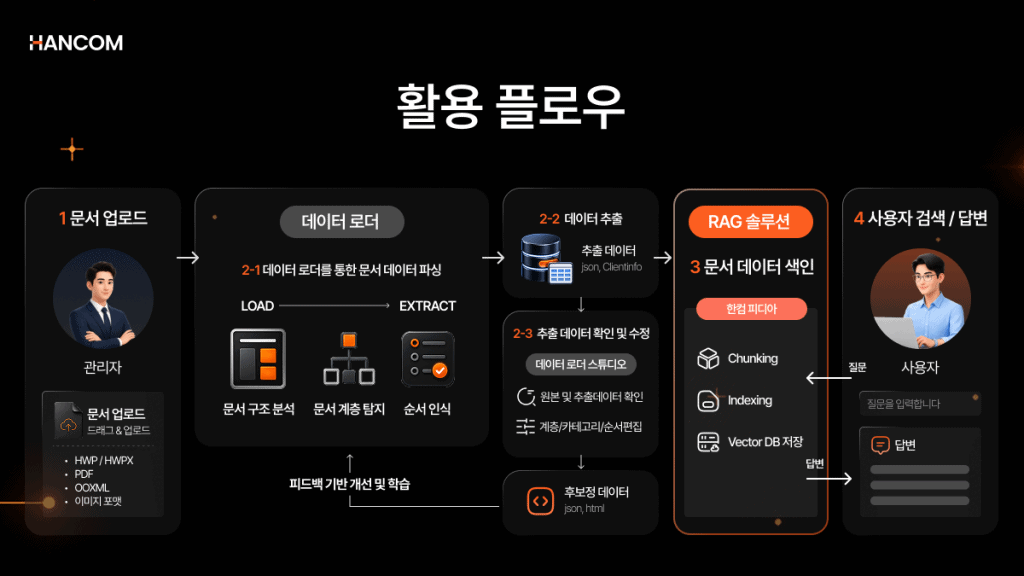
The RAG process from document extraction through answer generation can be summarized in seven steps, and Hancom Data Loader covers the first two steps: document extraction and parsing.
- Document extraction – Retrieve content from the original document
- Parsing – Distinguish titles, body text, and table structure and organize them into structured data
- Chunking – Split the document into pieces suitable for retrieval
- Embedding – Convert each piece into a numeric vector
- Vector DB storage – Store vectors in a database for retrieval
- Retrieval – Find pieces that are close to the question
- LLM answer – Generate an answer based on the retrieved pieces
Steps 3 through 7—chunking through answer generation—are handled by our RAG solution, HancomPedia. The hierarchy information extracted and parsed by Data Loader becomes the basis for HancomPedia to split documents into semantic units. Microsoft technical documentation also introduces a flow that first extracts layout information and then performs meaning-based chunking to keep tables and paragraphs together as a single unit. In both cases, the same point holds: the more accurately structure is defined upfront, the easier downstream steps become.
How to choose a document parsing solution
How to choose a document preprocessing tool for RAG
When selecting a document preprocessing tool for RAG, you can use three criteria: accuracy of structure preservation, ability to handle complex elements such as tables and images, and flexibility of deployment environments.
First, for structure preservation accuracy, check whether tables, footnotes, and paragraph hierarchies are preserved as in the original. The more diverse the document types, the larger the gap becomes. A document parsing benchmark study explains that parsing performance can be compared fairly only by evaluating across nine document types—such as papers, textbooks, notes, and newspapers—and nineteen layout items. A tool that performs well only on specific documents may be unstable on real business documents.
Next is the ability to handle complex elements. To handle merged-cell tables, scanned images, and multi-column documents, DLA, OCR, and TSR are all needed together. Finally, consider the deployment environment. For public-sector or financial organizations that cannot send documents outside, on-premises installation is appropriate; for rapid pilots, a usage-based SaaS API model is a better fit.
Hancom Data Loader converts HWP, HWPX, PDF, and OOXML into structured data based on these three criteria and supports both on-premises and SaaS API deployments.
💡 Looking for a guide that summarizes exactly what output you get by input format at a glance?
You can find it in the Hancom Data Loader Getting Started Guide.

The impact of document parsing, seen through real adoption cases
The impact of document parsing is clearly demonstrated in the Gyeonggi Provincial Office of Education case. According to Digital Daily coverage, Hancom Data Loader converted approximately 2,800 school websites, about 40,000 guidance materials, and about 7,000 laws and guidelines into structured data that AI can learn from.
This project was the “AI- and data-centric Gyeonggi Education Digital Platform 구축,” led by an LG CNS consortium, and it is the first large-scale AI platform undertaken among provincial and metropolitan offices of education nationwide. Hancom Data Loader handled the front-end step of parsing HWP, HWPX, and PDF documents to create AI training data, and downstream Q&A and document-writing support continued through our RAG solution HancomPedia and Hancom Assistant. As reported by IT Daily, it is a real-world example of implementing “datafication” that turns accumulated public documents into AI-usable assets.
💡 Document parsing is not an end in itself—it is the first step in building RAG.
If you are considering not only structuring documents but also the next steps—RAG retrieval and answers—you can request a consultation about Hancom Data Loader.
Frequently Asked Questions
Can Word documents be converted directly to JSON?
No. In the Solution environment, Word is output not as JSON but in the Clientinfo format. Clientinfo is also a text-based output format that AI can use, like JSON and HTML, so it can be utilized without issue—but it is different from “direct JSON conversion.”
Why are parsing methods different for HWP and Word documents?
HWP is a binary file and HWPX is a structured XML-based format, but both require direct interpretation of the internal file structure, so they are processed via direct parsing of the original. Word is already structured in XML and is processed via text extraction, which is why the approaches differ.
Can merged cells or multi-row headers inside tables also be converted accurately?
TSR restores cell relationships for merged cells, multi-row headers, and even nested tables, and exports in Markdown, JSON, or HTML at the cell/row/column level. This reduces linkage errors between values and fields that occur when extracting only text.
Can HWP files be parsed without converting to PDF?
Yes. Because the original binary is parsed directly, you do not need a PDF conversion step. In fact, double conversion to PDF damages structure and increases processing time by about 15.8× compared to direct extraction (9.5 seconds).
Can parsed document data be used directly for retrieval in RAG?
Hancom Data Loader handles extraction and parsing, while chunking, embedding, retrieval, and answers are handled by our RAG solution, HancomPedia. The hierarchy information extracted by Data Loader becomes the basis for subsequent semantic chunking.

HWP and Word document parsing: format-appropriate methods determine RAG quality
Parsing HWP documents and parsing Word documents require different approaches. HWP/HWPX preserve tables, footnotes, and metadata by directly parsing the original binary, while Word extracts already-structured text, and outputs vary by environment as JSON or Clientinfo. In all cases, how accurately you preserve structure during parsing determines the quality of downstream RAG retrieval and answers.
Document parsing is not simply extracting characters; it should be viewed as the first step in turning accumulated documents into data that AI can use. This is because whether you can handle different processing methods for each format within a single pipeline ultimately becomes the criterion for tool selection.
Hancom Data Loader is a document parsing solution that converts HWP, HWPX, PDF, and OOXML into structured data. The extracted data can be integrated with our RAG solution, HancomPedia, enabling you to build—from document collection to retrieval and answers—on a single Hancom stack. You can start with trusted document preprocessing using Hancom Data Loader.
👉 View the Hancom Data Loader API Guide
References
- arXiv, Dong et al., “SCAN: Semantic Document Layout Analysis for Textual and Visual Retrieval-Augmented Generation”, 2025
- arXiv, Zhang et al., “Document Parsing Unveiled: Techniques, Challenges, and Prospects for Structured Information Extraction”, 2024
- arXiv, Zhang et al., “OCR Hinders RAG: Evaluating the Cascading Impact of OCR on Retrieval-Augmented Generation”, 2024
- arXiv, Lin et al., “TSRFormer: Table Structure Recognition with Transformers”, 2022
- arXiv, Ouyang et al., “OmniDocBench: Benchmarking Diverse PDF Document Parsing with Comprehensive Annotations”, 2024
- Databricks, “Build an unstructured data pipeline for RAG”
- Microsoft, “Complex Data Extraction using Document Intelligence and RAG”
- Hancom Tech, Woojin Jung, “HWP Document File Format: A Look at the HWP Format Structure”, 2025
- Hancom Tech, Woojin Jung, “HWP Document File Format: Parsing the HWP Format with Python (1)”, 2025
- Hancom Tech, Younggil Yoon, “HWP Documents for the AX Era: An Analysis of the Open-Source Ecosystem and Activation Strategies”, 2025
- Digital Daily, Anna Lee, “Hancom Participates in the Gyeonggi Provincial Office of Education AI Platform Project”, 2025
- Newsis, Hyeri Song, “Hancom Participates in the AI-Based ‘Gyeonggi Education Digital Platform 구축’ Project”, 2025
- IT Daily, “[AI Solution Conference] Hancom: ‘Turning accumulated public documents into AI assets… the key is datafication’”, 2025