From RAG vs. Fine-Tuning to Choosing a Preprocessing Tool | Where Should You Start with Internal Document AI?
When building internal document–based AI for AI transformation (AX), the first decision is whether to train the model or to retrieve and use the documents you need.
This is where the comparison between RAG and fine-tuning begins. RAG (Retrieval-Augmented Generation) retrieves documents outside the model and uses them as evidence for answers, while fine-tuning further trains the model itself to reflect specific knowledge or response styles.
In this article, we compare the differences between RAG and fine-tuning, outline what you should decide first when building internal document AI, and—if you choose RAG—summarize what criteria to use when evaluating preprocessing tools.
Why can’t an LLM alone answer internal document questions accurately?
The point in time up to which an LLM’s training data reflects knowledge is called the knowledge cutoff. When asked about internal documents that are not in its training data, the model tends to fabricate plausible-sounding content rather than say “I don’t know.” This phenomenon—producing incorrect answers as if they were facts—is called hallucination.
That’s why, when building internal document–based AI, the question arises: “How do we connect our knowledge to the model?”
The answer broadly splits into two paths. One is fine-tuning, which retrains the model itself on your data. The other is RAG, which does not retrain the model, but retrieves the necessary documents and generates answers grounded in that content. In this article, we’ll briefly compare how the two approaches differ in practice.
Comparing the differences between RAG and fine-tuning
RAG and fine-tuning are two ways to adapt an LLM to a specific task. According to Google Cloud’s fine-tuning overview, fine-tuning adjusts a model’s parameters by further training a pre-trained LLM on task-specific datasets. By contrast, RAG doesn’t retrain the model; instead, when a question comes in, it finds relevant content in an external document repository and includes it in the prompt for use.
Put simply, RAG is like keeping an “internal document library” next to the model and having it look things up as needed, while fine-tuning is closer to additional training so the model follows specific task knowledge or response styles more effectively.
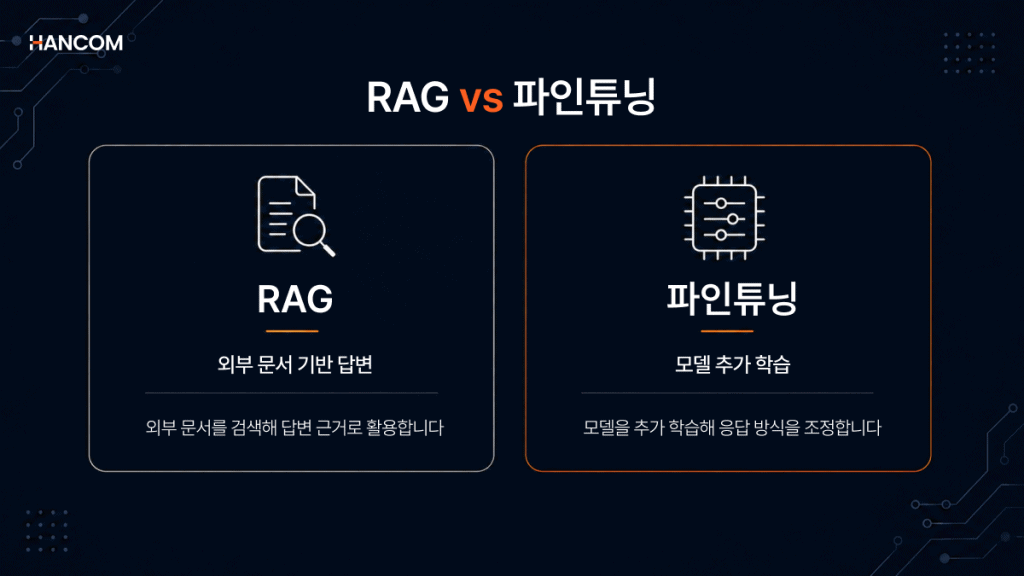
Comparing how RAG and fine-tuning work
RAG is an approach that, rather than retraining the model itself, retrieves relevant content from an external document repository when a question comes in and includes it in the prompt.
By contrast, fine-tuning further trains the model on task-specific data to embed knowledge or response styles for a particular domain into the model. The two approaches differ starting from what they change.
In a comparative study by Microsoft researchers, RAG is described as augmenting prompts with external data, while fine-tuning is described as integrating additional knowledge into the model itself. Even though both enhance knowledge, RAG differs in that it retrieves relevant documents and provides them as answer context, whereas fine-tuning further trains the model on task-specific data.
Comparing how RAG and fine-tuning work
| Comparison criteria | RAG | Fine-tuning |
| How knowledge is used | Finds the required information in documents outside the model and uses it together in the answer. | Further trains the model on task-specific data to tailor it to a specific task. |
| How the model is changed | Provides retrieval results as answer context without significantly changing the model itself. | Can adjust the model’s weights or some parameters. |
| How new documents are reflected | Can incorporate new documents into the retrieval target to use up-to-date information. | To reflect new information in the model, you need to consider additional training or retraining. |
| Verifying answer evidence | If you present the retrieved documents together, it’s easy to verify the basis for the answer. | Because the answer is generated inside the model, tracing evidence at the document level is relatively difficult. |
| Best-fit situations | Suitable when documents change frequently or when verifying sources is important. | Suitable when you need to align terminology, response formats, or classification criteria. |
It’s hard to say that either RAG or fine-tuning is always better. In Microsoft’s comparative study, applying fine-tuning and RAG together to a specific agriculture dataset further improved accuracy. In other words, the two are less competitors than complementary approaches that can be used separately or combined depending on the goal. If you need to quickly reflect the latest documents and verify answer sources, consider RAG first. If you need to adjust the tone or response format for a specific task, consider fine-tuning first.
A domain-specialized model case: BloombergGPT
Fine-tuning is useful for aligning a model to a specific task’s tone or response format. However, the more you aim to reflect a domain’s knowledge more broadly and deeply within the model itself, the greater the burden of data preparation and training infrastructure. BloombergGPT is a representative example.
According to the BloombergGPT paper, BloombergGPT is a finance-specialized LLM with 50 billion parameters, trained from scratch using both financial data and general-purpose data. Rather than a typical fine-tuning case, it is closer to a large-scale pre-training case where the model itself was designed and trained for the finance domain.
Domain-specialized models like this can deliver high expertise, but they also require substantial training resources. In an HPCwire analysis, BloombergGPT training reportedly used about 1.3 million GPU hours, with an estimated cost of around $3 million on AWS.
Therefore, fine-tuning or building your own model can be a powerful option when your goals and budget are clear. However, for most public institutions and companies that are at the early stage of building internal document–based AI, it’s often more realistic to start by considering RAG, which retrieves external documents and uses them to generate answers rather than training a new model from scratch.
RAG selection criteria: when is RAG the right fit?
If documents change frequently, if you need to verify the evidence behind answers, or if it’s difficult to send internal documents outside your organization, RAG is a strong first option to consider. These conditions are common in internal document–based AI, which is why RAG often becomes a practical starting point.
Criteria to consider when building RAG
If documents change frequently, if you need to verify the basis for answers, or if it’s difficult to send documents outside your organization, RAG is a strong first option to consider. That’s because RAG doesn’t retrain the model itself; it retrieves the necessary documents and uses them as answer context.
For example, if you’re dealing with documents that are continuously added or revised—such as policy documents, work manuals, official notices, or legal/financial materials—retraining the model every time can create a heavy operational burden. RAG, on the other hand, can use the latest documents by parsing, chunking, and embedding new content and adding it to the retrieval target.
RAG is also advantageous in areas like the public sector, finance, and legal work where you must verify answer sources. Presenting the retrieved original documents together makes it easier to confirm which documents the answer was based on. And if security constraints make it difficult to send documents to an external cloud, you can also consider an on-premises RAG setup with a document repository and retrieval pipeline inside your internal network.
In summary, for internal document–based AI where documents change frequently and source verification matters, RAG can be a practical starting point. Conversely, if you need to adjust the model’s response behavior itself—such as tone, response format, or classification criteria—it’s best to consider fine-tuning as well.
*Reference content: elastic, “RAG vs. Fine Tuning, a practical approach”, 2025
Why RAG preprocessing quality matters
RAG answer quality is not determined by LLM performance alone. It also depends on how accurately you read documents and how well you preserve their structure when converting them into searchable data. Even with an excellent model, if documents are extracted incorrectly, the AI can generate answers based on incorrect evidence.
The problem often occurs during the data extraction stage. For example, if a table title is extracted without being linked to its data, the AI may read the same numbers but struggle to tell which item those numbers belong to. If the relationships between table rows and columns, headings and body text, or captions and images break down, the retrieved document chunks themselves can become incomplete.
That’s why the starting point for RAG isn’t only “Which LLM should we use?” but also “How do we parse documents accurately?” ChatDOC researchers pointed out that low PDF parsing accuracy can affect the quality of expert knowledge–based Q&A. In comparative experiments, they also showed that parsers that better recognize document structure can provide more accurate and complete retrieval results, which can lead to improved RAG answer quality.
📚 Recommended reading
RAG performance is determined not by AI, but by ‘document preprocessing’ | Hancom Data Loader
What to check when choosing a RAG preprocessing tool
When selecting a RAG preprocessing tool—an LLM preprocessing tool that converts documents into data the AI can read—you should evaluate whether it parses originals directly, recognizes table and document structure, extracts while preserving document hierarchy, and can be deployed on-premises.
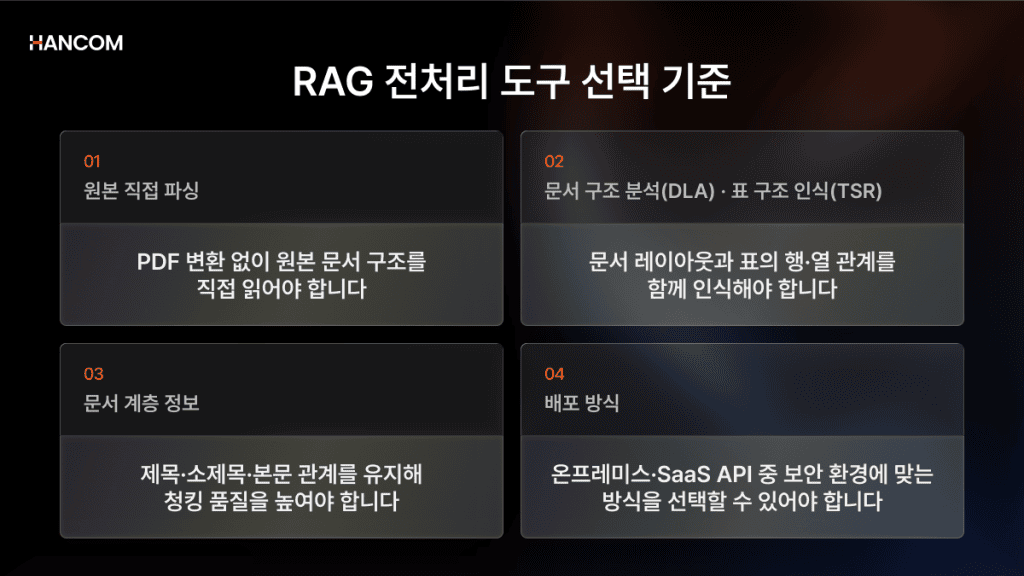
Whether it supports direct parsing of original files
When choosing a preprocessing tool, first check whether it parses the original files directly without converting documents to PDF. Information can be lost during conversion.
Some tools are labeled as “supported” but internally convert to PDF before processing. In such cases, HWP parsing errors are more likely to occur, breaking table structures or heading hierarchies. In particular, because HWP and HWPX are widely used in documents from Korean public institutions, it’s important to verify whether the tool can parse the originals directly without conversion.
Table structure recognition (TSR) and document layout analysis (DLA)
When evaluating a RAG preprocessing tool, you should check both TSR (Table Structure Recognition) and DLA (Document Layout Analysis). Internal documents often contain tables with merged cells, multi-level headers, notes, and images. If you extract them as plain text only, the relationships between rows and columns can easily break.
For example, if only the numbers in a table are extracted and they aren’t linked to what items and periods they represent, the AI can produce incorrect answers even when looking at the same data. The technology needed here is TSR. TSR identifies relationships between cells to preserve row/column structure and converts merged or complex tables into a form that is easier for AI to understand.
Accurately reading tables alone is not enough. You also need to understand how headings, body text, tables, images, and captions are arranged in what order and relationship within the document. DLA distinguishes these document elements and restores the reading order, helping ensure that meaning units aren’t broken during the subsequent chunking stage.
Chunking quality and reflecting document hierarchy
Because chunking that reflects a document’s hierarchical structure determines retrieval accuracy, you should verify whether the preprocessing stage extracts content while preserving hierarchy information for headings and body text.
To use long documents for retrieval, you go through a chunking process that splits them into appropriately sized pieces. Instead of mechanically cutting by character count, using a document chunking strategy that reflects the hierarchy and meaning of headings, subheadings, and body text—i.e., semantic chunking—keeps meaning grouped together and improves retrieval accuracy. Microsoft Azure’s RAG chunking guide also explains that document structure affects chunking methods.
Chunking itself is a task at the RAG solution stage rather than the preprocessing tool stage, but the more accurately the preprocessing tool extracts hierarchy information, the better semantic chunking can operate later based on that information. In that sense, how well hierarchy is preserved during preprocessing is the starting point for chunking quality.
Deployment options and security environment
When choosing a RAG preprocessing tool, it’s a good idea to check both on-premises deployment and SaaS API integration. For environments like financial networks, closed networks, or public institutions where it’s difficult to send documents to the cloud, an on-premises approach that can be installed and operated directly inside the internal network is suitable. Because documents are not transmitted externally, it’s a good fit to consider in high-security environments.
Conversely, if you need rapid testing or a pilot rollout, you can also choose a SaaS API approach. With SaaS APIs, you can integrate without building separate servers, and because costs accrue based on usage with per-page billing, you can reduce upfront investment. It can also be used to verify parsing quality on real documents before moving to an on-premises build.
👉 Check parsing results instantly with your own documents (Live demo)
RAG preprocessing tool adoption environments: public sector, finance, internal documents
If HWP/HWPX usage is high, or if you’re in an environment like a closed network or financial network where it’s difficult to transmit documents externally, choosing a RAG preprocessing tool becomes even more important. For documents with many tables, images, and hierarchical structures, simple text extraction can break meaning relationships—so the key is whether the tool can parse original documents directly and preserve structure.
RAG for public sector, finance, and legal documents
In the public sector, finance, and legal domains, document security and verifying answer sources are critical. In these environments, many organizations prioritize considering an on-premises RAG setup that can process documents within the internal network rather than uploading documents to an external cloud.
Also, in public-sector document environments, HWP/HWPX and PDF are often used together. HWPX is an XML-based open format, which is advantageous for use as structured data, but in real-world settings where you must handle legacy HWP documents and PDFs together, you need a preprocessing tool that can reliably parse multiple formats.
Building internal knowledge search and business chatbots
Internal manuals, reports, and guidelines often include many tables and hierarchical structures. If the relationships between headings and body text, table titles and data, or images and captions are broken during extraction, chatbot answer accuracy can also decline.
Getting started with internal AI: Hancom Data Loader
🖥️Hancom Data Loader
Internal documents are often a mix of HWP/HWPX and PDF, so whether you can handle them with a single solution determines operational efficiency. There have already been reported adoption cases in the public and education sectors. In the Gyeonggi Provincial Office of Education’s AI Digital Platform Development project, Hancom participated in an LG CNS-led consortium and was responsible for preprocessing that structures school websites, guidance materials, and guideline/legal data while preserving hierarchy, coordinates, and complex tables across HWP, HWPX, and PDF.
Internal document AI starts with choosing between fine-tuning and RAG, but in environments where documents change frequently and source verification is important, RAG can be a practical starting point. If you choose RAG, answer quality depends heavily on preprocessing quality—so the criteria you use to select a preprocessing tool ultimately becomes the key.
If you’re considering adopting internal document AI, first upload real documents in the Hancom Data Loader live demo and check the parsing results.
👉 Check parsing results instantly with your own documents (Live demo)
👉 Get implementation consulting tailored to your environment
Frequently asked questions (FAQ) about RAG preprocessing
What’s the difference between RAG and fine-tuning?
RAG keeps the model as-is and injects answers by retrieving external documents, while fine-tuning retrains the model itself to imprint knowledge inside the model. RAG is advantageous for quickly reflecting new information and reducing costs, while fine-tuning is advantageous for internalizing domain tone and formats in the model.
When building a RAG pipeline, how should we handle document preprocessing?
To improve retrieval quality, you should parse documents while preserving the original structure—keeping tables and heading hierarchy—then chunk and embed while reflecting that hierarchy. Because preprocessing quality determines RAG answer accuracy, it’s important to prevent structure from breaking during extraction.
What are the criteria for choosing a document preprocessing tool for RAG?
Choose based on four criteria: direct original parsing, table/document structure recognition, extraction that preserves hierarchy information, and on-premises deployment. In closed-network environments, also verify whether it can be installed inside the internal network and operated without sending documents externally.
References
- Google Cloud, “Fine-tuning LLMs and AI models”
- Arxiv, “RAG vs Fine-tuning: Pipelines, Tradeoffs, and a Case Study on Agriculture”, 2024
- Arxiv, “BloombergGPT: A Large Language Model for Finance”, 2023
- HPCwire, “Bloomberg Uses 1.3 Million Hours of GPU Time for Homegrown Large Language Model”, 2023
- Arxiv, “Revolutionizing Retrieval-Augmented Generation with Enhanced PDF Structure Recognition”, 2024
- Elasticsearch Labs, “RAG vs. Fine Tuning, a practical approach”, Elasticsearch Labs, 2025
- Microsoft Learn, “Developing RAG Solutions – Chunking Stage”