RAG Pipeline Document Parsing, Hancom Data Loader API Integration Guide
If you’ve built a RAG (Retrieval-Augmented Generation) pipeline but the answers are consistently inaccurate, the cause might not be the Large Language Model itself, but the document parsing that precedes it.
RAG generates answers by retrieving external documents. If tables are damaged and paragraph hierarchies are lost when documents are input, even a high-performing model will reference incorrect chunks, leading to poor results.
In fact, there are studies showing that chunking that preserves the structural elements of a document significantly improves RAG results compared to chunking that ignores structure. This article will cover everything from the role of document parsing to API integration, utilizing structured data, and on-premise deployment in a closed network.
Why is Document Parsing Important in a RAG Pipeline?
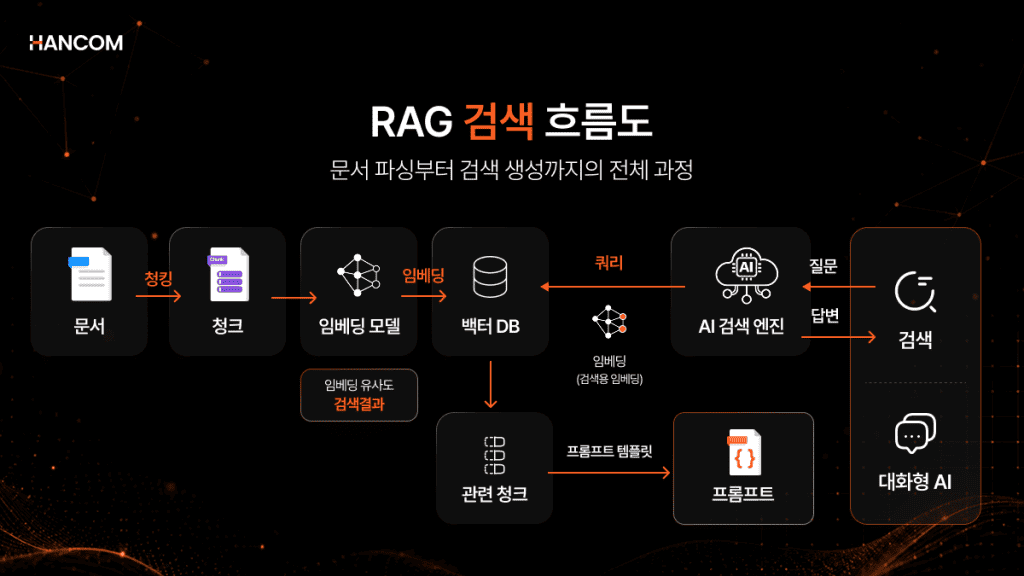
The RAG pipeline flows in the order of document extraction → parsing → chunking → embedding → Vector DB storage → retrieval → LLM response. If the quality of document extraction and parsing, which are the initial stages, is low, subsequent chunking, embedding, and retrieval will be misaligned, leading to reduced answer accuracy.
Overall Flow of RAG Pipeline and the Position of Document Parsing
The RAG pipeline is divided into an indexing phase (document extraction, parsing, chunking, embedding, Vector DB storage) where documents are pre-processed and stored, and a query phase (retrieval, LLM response) where questions are answered. Document parsing is located at the very beginning of the indexing phase. Here, Document Parsing refers to the preprocessing step of distinguishing and restoring elements like titles, body text, and tables from unstructured documents, transforming them into a structured, machine-readable format.
RAG Pipeline Stage-by-Stage Input and Output
| Stage | Input | Output |
| Document Extraction | Original Document (HWP, HWPX, PDF, etc.) | Raw Elements (text, tables, images, etc.) |
| Parsing | Extracted Raw Elements | Structured Data (separated into title, body, table elements) |
| Chunking | Structured Data | Text Chunks Divided by Semantic Units |
| Embedding | Text Chunks | Vectors (numerical arrays) |
| Vector DB Storage | Vectors | Searchable Index |
| Retrieval | User Query | Chunks Similar to Query |
| LLM Response | Query + Retrieved Chunks | Final Answer |
Up to parsing is the process of converting documents into structured data, and from chunking onwards, it’s the process of creating semantic units for retrieval and response. Hancom Data Loader is the solution dedicated to document extraction and parsing.
Why Does Document Parsing Quality Determine Search Accuracy?
Flat text with a broken structure is difficult to divide into semantic units, leading to misaligned chunking boundaries. This causes retrieval to fetch irrelevant chunks, resulting in AI generating responses that lack context.
Chunking should be based on semantic units, not just character count. If structural information is lost, this criterion becomes unclear.
For example, if a table is split into multiple chunks, a header like ‘2024 Sales’ and a value like ’12 billion KRW’ might be scattered into different pieces, preventing retrieval from reconstructing their relationship. The same applies if the hierarchy between titles and body text is damaged, creating chunks whose chapter affiliation is unknown.
Indeed, research has reported that chunking based on the structural elements of a document significantly improves RAG results for financial reports compared to traditional chunking that ignores structural information. Ultimately, structure-preserving extraction is the starting point for building a RAG pipeline.

How to Integrate the Document Parsing API?
Hancom Data Loader’s Document Parsing API operates in a 3-step asynchronous flow: conversion request → completion check → result download. The processing status is tracked using the identifier (api_history_id) received in the initial response.
Asynchronous means that instead of receiving results immediately after sending a request, you check for completion separately while the task is processed in the background. By familiarizing yourself with the document parsing API integration method during RAG pipeline construction, you can process any document format using the same flow later on.
3 Steps from Conversion Request to Result Download
Document parsing API integration proceeds in the order of conversion request → completion check (Webhook or polling) → result download. All calls use https://api.sdk.hancom.com/api/api-services as the base URL, and authentication is handled by including the issued X-API-Key in the header.
- Conversion Request
- Send the file to POST /api/api-services/convert.
- Include the X-API-Key in the header and send the file to be converted and the webhook_url (HTTPS required) to receive results via multipart/form-data. The response will contain api_history_id, which is the key for subsequent steps.
- Completion Check
- Receive a Webhook (recommended) that notifies the specified address when the task is complete, or directly query the status via GET /api/api-services/status/{api_history_id} (polling).
- The status changes from PENDING → PROCESSING → DONE. If there’s an issue, it will show as FAILED.
- Result Download
- Download the structured result file result.aijson via GET /api/api-services/download/{api_history_id}.
Since both status inquiry and result download are performed using the api_history_id received in the initial response, you must save this value immediately after the request.
👉 Review Hancom Data Loader API Guide
What are the Constraints to Check When Using the REST API?
To properly understand how to use the REST API, you must first check four things: file size/encryption, input/output formats, communication/credits, and call frequency.
When integrating with the REST API, it’s recommended that each file be a maximum of 100MB and 1,000 pages or less. Encrypted (DRM) documents require prior decryption, and it’s important to note that input is fixed to HWP, HWPX, PDF, and output to aijson.
The pattern of asynchronously processing large-volume, multi-page documents is a standard method commonly used in cloud document AI services like AWS Textract. For example, AWS Textract advises that for PDFs with many pages, asynchronous processing allows other tasks to be performed concurrently. Hancom Data Loader’s recommended 1,000-page limit is a separate, self-imposed standard for processing stability.
3 Constraints to Check Before Integration
✅ File size & encryption
Files are recommended to be no larger than 100MB and no more than 1,000 pages, so it is best to split large documents in advance. Encrypted (DRM) or password-protected documents cannot be converted, so you must disable security beforehand.
✅ Input & Output Formats
The API only supports HWP, HWPX, and PDF as input, and the result is structured JSON (aijson).
✅ Communication & Credits
All calls and Webhooks only allow HTTPS. Credits are based on 10 Credits per page, and automatic refunds are issued for failed conversions.
✅ Call Frequency
The conversion request API can be called up to 20 times per second. When processing a large volume of documents at once, it is safer to distribute requests considering this limit.
You can directly check API results by uploading HWP, HWPX, or PDF files to the Hancom Data Loader Live Demo.
How to Utilize Structured Data Results for RAG Preprocessing
When metadata such as paragraph hierarchy, table structure, and coordinates are extracted together, it allows for more accurate chunking boundaries than simply extracting text, thereby increasing RAG search accuracy.
How are Flat Text and Structured Data Different?
Flat text is a simple sequence of characters where table and hierarchical information is lost, while structured data maintains the document structure with metadata attached to each element. Hancom Data Loader’s result file, aijson, contains extracted elements in an ‘elements’ array, preserving ‘category’ (element type like title, table, body), ‘level’ (paragraph hierarchy), and ‘bbox’ (coordinates) for each element.
At a Glance: The Difference Between Flat Text and Structured Data
| Item | Flat text | Structured Data |
| Table Structure | Row/column relationships lost, only characters listed | Table structure maintained at cell level |
| Paragraph hierarchy | Title/body distinction lost | Hierarchy preserved by ‘level’ |
| Coordinates/Location | No location information | Location information preserved by ‘bbox’ |
| Chunking Utility | Difficult to divide into semantic units | Boundaries can be set based on metadata |
The core of structured data is metadata. If it’s explicitly stated which text is a title and which cell belongs to a table, chunking can use these boundaries to divide semantic units. This metadata then becomes the baseline for the next stage of chunking.
Which Stages of RAG Does Hancom Data Loader Cover?
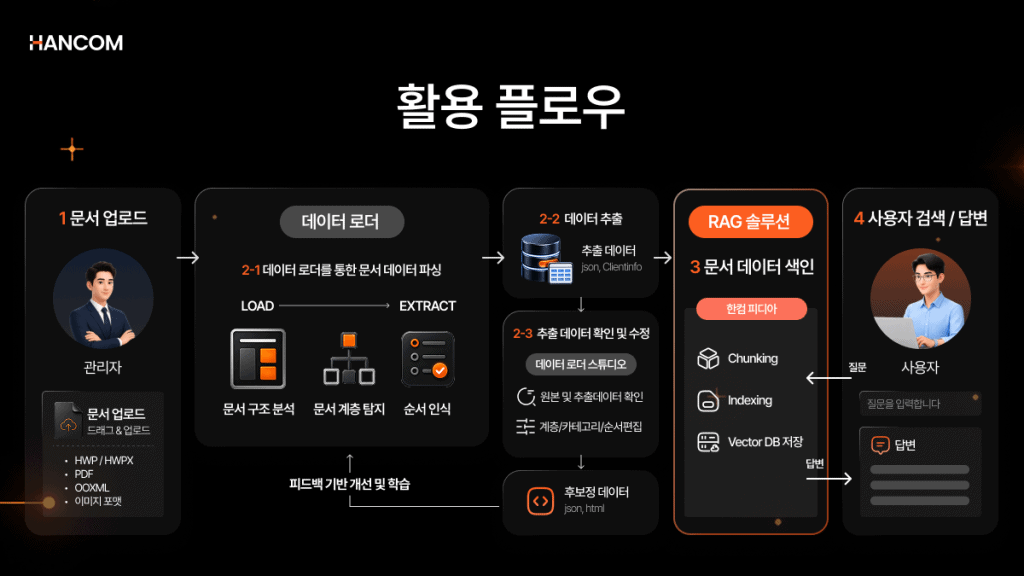
Hancom Data Loader handles document extraction and parsing to generate structured data (aijson). Subsequent chunking, embedding, and retrieval are performed by Hancom’s RAG solution, Hancom Pedia. While Hancom Data Loader does not directly perform chunking, the extracted hierarchical information (level, category) is utilized by Hancom Pedia as a criterion for semantic chunking.
The perspective of separating extraction/parsing from subsequent stages is also useful for combining tools. Global tools like Unstructured also classify documents by element types such as Title, Table, and ListItem, and output them with coordinate and hierarchical metadata. This indicates that structured extraction has established itself as an independent stage of RAG preprocessing. Clearly defining the boundaries of which tool handles extraction and which stages handle chunking/retrieval makes RAG architecture design and tool selection much easier.
Can a RAG Pipeline be Built in On-Premise/Closed Network Environments?
Hancom Data Loader supports two deployment methods: SaaS API and on-premise. This allows for building a RAG pipeline with on-premise document AI installed within an internal network, even in environments requiring closed-network RAG deployment where documents must not leave the internal system.
What’s the Difference Between SaaS API and On-Premise?
SaaS API can be integrated immediately without separate installation, while on-premise involves direct installation on the customer’s internal server, ensuring document data does not leave the external network.
SaaS API can be integrated immediately without building a separate server, reducing initial investment costs, and billing is per page, so you only pay for what you use. It’s suitable for quick testing or pilot projects before on-premise deployment. However, while SaaS API deletes original files immediately after conversion and stores results for 7 days before automatic deletion, the data passes through an external server during processing, which is a different concept from on-premise’s ‘no external transmission at all.’
On-premise is installed and operated directly on the customer’s internal server, meaning documents are not transmitted externally, allowing it to function even in closed networks with internet restrictions. It is suitable for environments with high security requirements, such as public sector or finance.
Criteria for Choosing the Right Deployment Method for Your Environment
If rapid adoption and cost efficiency are priorities, SaaS API is suitable. If network isolation and security requirements are key, on-premise is appropriate. On-premise can be deployed within an internal network as a container-based REST API.
Deployment Method Selection by Scenario
✅ When SaaS API is suitable
If you want to quickly verify results with a pilot project or reduce initial server infrastructure investment, SaaS API is the right choice. With per-page billing, you can start small-scale verification without burden.
✅ When On-Premise is suitable
If network isolation and security guidelines must be strictly adhered to, or if a RAG pipeline needs to be built in a closed network for public sector or finance, on-premise is appropriate. On-premise can be deployed within an internal network as a container-based REST API, operating with standard REST calls without the burden of separate SDK installation. A container is a technology that bundles applications into an isolated environment, allowing them to run consistently anywhere.
Hancom Data Loader provides the same extraction engine for both methods, ensuring consistency in results whether using SaaS API or on-premise.
RAG Pipeline and API Integration: Frequently Asked Questions
How to Choose a Document Preprocessing Tool for a RAG Pipeline?
You should decide based on three criteria: the range of document formats to be processed, the accuracy of structure preservation (maintaining tables/hierarchy), and the deployment method (SaaS/on-premise). For closed networks, on-premise support is virtually decisive, and Hancom Data Loader is a case that satisfies all three criteria.
Can documents with tables (merged cells, multi-column, headers) be accurately extracted via API?
Complex tables and non-Latin character documents are areas where extraction quality varies significantly among solutions. A benchmark for multilingual document parsing confirmed an average 14.0% performance degradation for non-Latin character documents. A study evaluating only PDF table extraction also showed significant performance differences among various parsers. Hancom Data Loader restores tables without borders, merged cells, and multi-column headers at the cell level using TSR (Table Structure Recognition).
Can the Data Loader API be used directly in container or REST API environments?
Since it is called using a standard REST method, it can be used identically in container environments without separate SDK installation. By simply including the X-API-Key header in an HTTPS request, it can be called regardless of language or environment, integrating directly within a container without additional configuration.
How to Start RAG Pipeline Document Parsing Now
If you’ve understood that document parsing quality determines search accuracy, that integration uses a 3-step asynchronous API, that hierarchical information from structured data serves as the chunking criterion, and that deployment in closed networks is on-premise, then you can immediately start building your RAG pipeline with Hancom Data Loader, which features a RAG document parsing API. In fact, in the Gyeonggi Provincial Office of Education’s AI Digital Platform Construction Project, Hancom Data Loader was used to convert data from approximately 2,800 school websites, over 40,000 guidance materials, and more than 7,000 guidelines/laws into an AI-trainable format.
💻 Hancom Data Loader
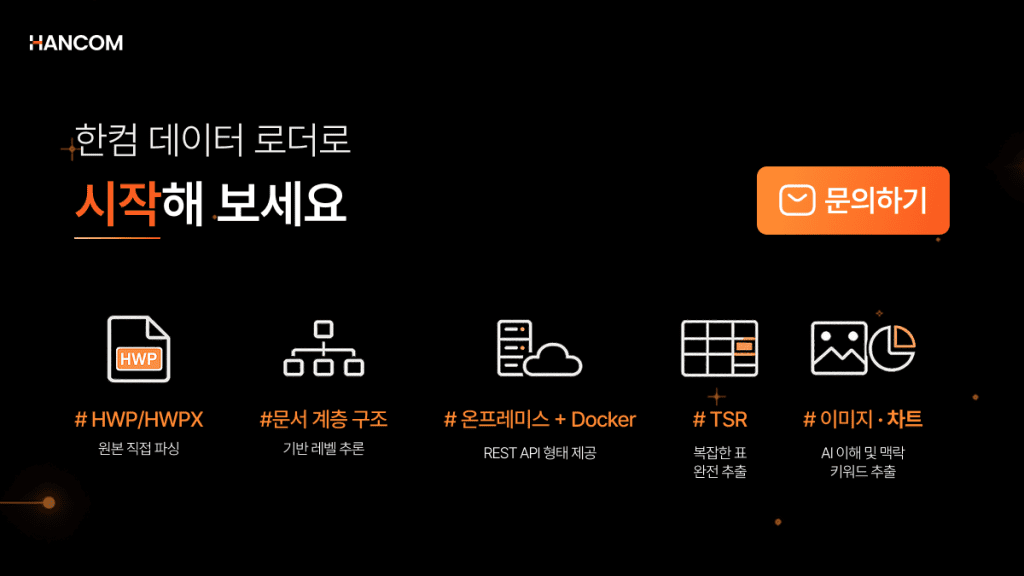
Hancom Data Loader is a document parsing solution that converts HWP, HWPX, PDF, and OOXML (PPTX, DOCX, XLSX) into structured data. The extracted data can be linked with Hancom’s RAG solution, Hancom Pedia, to build a unified Hancom stack from document collection to search and response. Start with Hancom Data Loader for reliable document preprocessing for your agent.
👉 Explore Hancom Data Loader
👉 Inquire about Hancom Data Loader Adoption
References
- AWS, “What is Retrieval-Augmented Generation (RAG)?”
- Antonio Jimeno Yepes et al., “Financial Report Chunking for Effective Retrieval Augmented Generation,” 2024
- AWS, “Processing Documents Asynchronously (Amazon Textract)”
- Unstructured, “Document elements and metadata”
- Zhang Li et al., “MDPBench: A Benchmark for Multilingual Document Parsing in Real-World Scenarios,” 2026
- Pius Horn·Janis Keuper, “Beyond String Matching: Semantic Evaluation of PDF Table Extraction,” 2026
- The Elec, “Hancom Participates in Gyeonggi Provincial Office of Education’s 38 Billion Won AI Project… Supplies Data Conversion Tool for Learning,” 2025