Review Your Document Before Submission with CopyKiller’s Plagiarism and AI Generation Checks

After writing assignments, theses, or reports, you might pause before clicking the submit button.
“Did I forget to cite any sources for the parts I quoted?”
“How should I verify sections where generative AI was used?”
To enhance document completeness, it’s essential to check not only for spelling and phrasing but also to ensure there are no instances of plagiarism due to missing citations or sections suspected of being written by generative AI.
CopyKiller allows you to verify both of these aspects through its Plagiarism Check and AI Generation Check.
Now, after creating a document in Hancom Office HWP, you no longer need to visit a separate website; you can use CopyKiller directly through Hancom Addons.
Plagiarism Check vs. AI Generation Check: What’s the Difference?
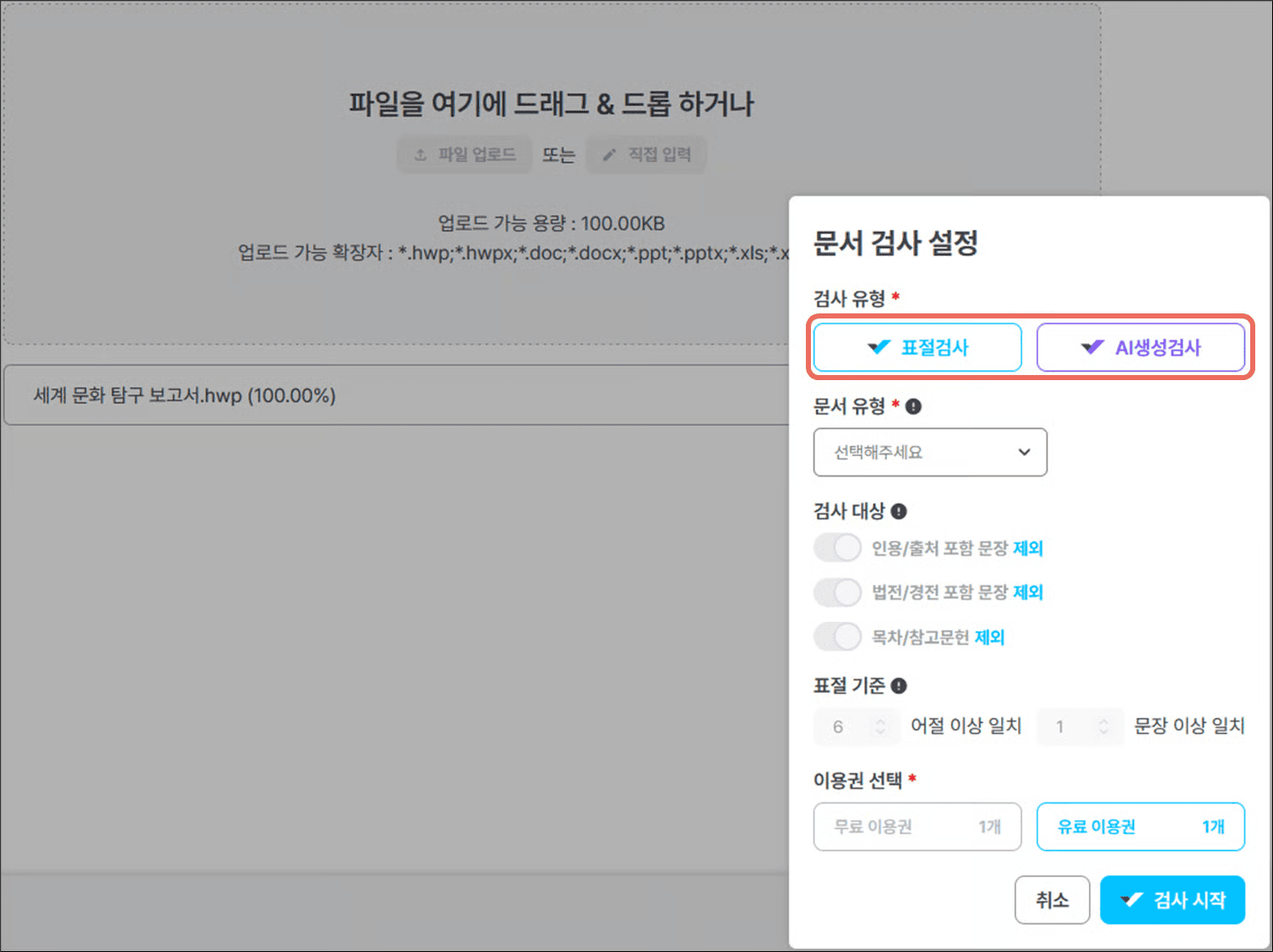
(Source: CopyKiller Official Manual)
While Plagiarism Check and AI Generation Check may seem similar, they serve different purposes.
The Plagiarism Check compares your document against CopyKiller’s comparison data to identify identical sentences from other sources and their origins.
CopyKiller compares documents based on over 10 billion data points, utilizing a comparison database that includes domestic theses and academic materials. The check results show the plagiarism rate along with the sources.
Conversely, the AI Generation Check analyzes the document’s text to identify sentence areas highly likely to have been written by generative AI, such as ChatGPT, Gemini, or Claude.
Therefore, the roles of the two checks are clearly distinct.
| Category | Plagiarism Check | AI Generation Check |
| Primary Purpose | Verifies plagiarism against other sources | Verifies potential AI authorship |
| Key Results | Plagiarism rate, plagiarized sentences, comparison sources | Sentence areas with high probability of AI authorship |
| How to Use | Review citations, sources, and plagiarized expressions | Identify and review suspected AI-generated areas |
It is easy to understand that Plagiarism Check and AI Generation Check are tools that examine documents from different perspectives.
If You’ve Used Generative AI, Double-Check with the AI Generation Check
As generative AI tools like ChatGPT, Gemini, and Claude are increasingly used in writing, criteria for AI usage in assignments and theses are becoming more important.
CopyKiller’s AI Generation Check allows you to identify areas in your document that are highly likely to have been written by generative AI.
If a specific sentence is flagged as a suspected AI-generated area in the check results, rather than judging the document solely on that result, it is necessary to review which sentences were flagged as suspicious.
It is especially advisable to review these results in conjunction with any specific generative AI usage guidelines set by your school or institution.
The AI Generation Check provides reference information to identify areas with a high probability of AI authorship, and it is not appropriate to use the check results alone to definitively determine the use of a specific AI.
Now, Check Your Documents with CopyKiller While Writing in HWP
Previously, after writing a document in HWP, you had to access the CopyKiller website, upload the document, and run the check. Now, you can use CopyKiller within your document creation workflow in HWP via Hancom Addons – CopyKiller.
This feature is supported in Hancom Office 2024 HWP version 13.0.0.3379 or higher. The installation steps are as follows:
- Open Hancom Addons from the ‘Add-ons’ tab at the top of HWP.
- Review the CopyKiller details and install it.
- Restart HWP, then click the service icon to launch it.
CopyKiller is an external partner service, requiring login with a CopyKiller account; integrated login with a Hancom account is not currently supported. Subscription and payment terms, as well as the scope of each check, follow CopyKiller’s usage policy. Plagiarism Check and AI Generation Check may have different execution methods or fees, so please check the information for your account in advance.

Hancom Addons Add-on Selection and Installation Guide Image (Source: Hancom Addons)
From Assignments to Theses: The Final Review for Better Writing
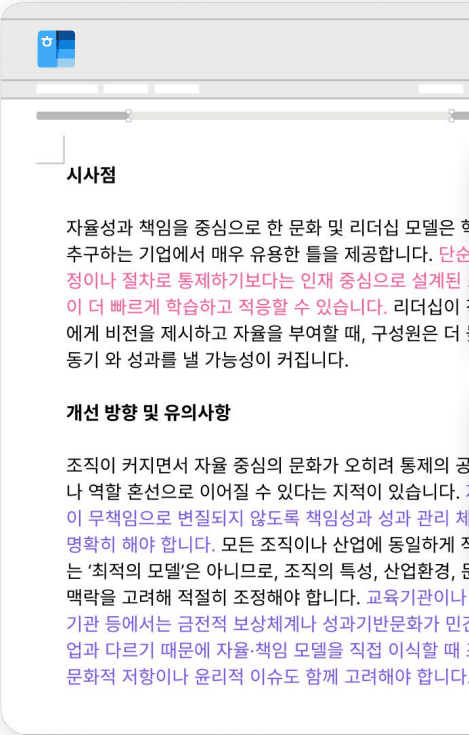
Example of CopyKiller’s Check Display
Generative AI has become a natural tool in the writing process. It can be used in various ways, such as organizing ideas, summarizing materials, or helping to start a difficult piece of writing.
What is important is not whether AI was used, but how you leveraged AI to complete it as your own writing.
CopyKiller helps you review your self-written documents once more through its Plagiarism Check and AI Generation Check, allowing you to confirm whether any parts require citation or if you have sufficiently understood and refined AI-assisted content into your own thoughts.
The check results serve as reference material to highlight areas for further review. By re-reading the flagged sentences and making necessary revisions, you can further refine your document to a higher level of completeness.
Moving beyond simply utilizing AI effectively, to completing the output as your own writing. Use CopyKiller’s Plagiarism Check and AI Generation Check as your final review tools before submission.
Frequently Asked Questions about Using CopyKiller
Do I need to convert HWP files to PDF to check them?
No. CopyKiller supports HWP and HWPX files, so there’s no need to convert them to PDF. HWPX or DOCX formats are recommended for recognizing source information like footnotes. If you’ve written your document in HWP, prepare it as an HWPX file.
Even with sources cited, it’s flagged as plagiarism. Do I need to rewrite all those sentences?
First, check if the source citation was properly recognized. If quoted sentences are included in the check scope, or if the system doesn’t recognize the citation format, it might be flagged as a suspected plagiarism area. Before making blanket revisions, review the citation style of the flagged sentences and your check settings, and verify them against the standards specified by your school or institution.
If I only used AI to refine sentences in my own writing, can it still be flagged by the AI Generation Check?
Yes, it can. Even if you wrote the text yourself, if you use generative AI for proofreading or translation, and the sentence structure and expressions change, it may be flagged as a suspected AI-generated area. If it’s a document for submission, keep the original draft and revision history before using AI, and check with the submission recipient about the extent to which AI use for proofreading or translation is permitted.
How can I use CopyKiller in HWP?
It can be used with Hancom Office 2024 HWP version 13.0.0.3379 or higher. Open Hancom Addons from the ‘Add-ons’ tab at the top of HWP and install CopyKiller. After installation, restart HWP and click the service icon to launch it.
Can I log in to CopyKiller with my Hancom account?
Integrated login with a Hancom account is not currently supported; you must log in with a CopyKiller account. Even when run from Hancom Addons, CopyKiller is an external partner service, so subscription and service usage terms follow CopyKiller’s policies.
From Document Creation to Submission, More Conveniently Within HWP
The process of creating a good document doesn’t end the moment you finish writing.
A document is truly complete for submission only after you’ve reread the content, verified necessary sources, and checked for similar expressions to other materials or areas with a high probability of AI authorship.
Now, you no longer need to seek out a separate service every time you want to use CopyKiller; you can utilize CopyKiller within your document creation workflow in HWP via Hancom Addons.
Write your document in HWP, then double-check it with CopyKiller’s Plagiarism and AI Generation Checks before submission.
Start CopyKiller in Hancom Addons →
CopyKiller is Korea’s leading document verification service, used for verifying theses, assignments, and reports since its launch in 2011. Usage terms can be found on the CopyKiller official website, and HWP integration methods can be found in Hancom Addons. If you are installing Hancom Addons for the first time, also refer to Hancom Addons: Adding Essential Features to HWP – From Service Selection to Installation.