Reviewing Toxic Clauses in HWP Contracts with AI: How to Use Allibee Summary and Review

Are you reviewing your contract for potential toxic clauses? While AI like ChatGPT and Gemini has advanced, complex tasks such as reviewing contract clauses often result in errors or failure to perform properly.
Reviewing toxic clauses in a contract begins by placing the agreed transaction terms and the original contract text side-by-side for comparison. Even when using AI for the review, you should ideally complete this cross-check manually first. Only then can you read the AI review and determine if the flagged clauses actually pose a problem for this specific transaction.
In this article, we will provide a detailed guide on how to review contracts, covering everything from organizing transaction terms to utilizing summaries and reviews, and finally, writing negotiation memos.
We will also introduce an AI contract and legal service that simplifies and automates these tasks.
👉 Learn more about Allibee, the contract review assistant, on the HanAddons website
Reviewing Toxic Clauses: Start by Cross-Checking Transaction Terms
Gathering Document Versions and Agreement Materials Before Review
When reviewing a contract, you must first verify if the document in your hand matches the actual agreement before starting the review. This is because AI only reads what is written in the document. It cannot know circumstances agreed upon verbally between managers or background details—such as whether an outsourcing project involves only delivery or includes operations—if they are not in the text.
Therefore, you must gather all contract versions and attachments to ensure they align with quotes and agreement memos. If an existing template was reused, it is common for amounts or schedules from previous projects to remain, so you must be careful.
Service Contract Review: Checking Scope, Payment, Deadlines, and Liability
Read the contract from beginning to end, but checking off these five items one by one will help reduce the chance of missing anything.
| Checklist Item | What to Find in the Original Text | Questions for the Practitioner |
|---|---|---|
| 1. Scope of Work | Tasks to be performed, deliverables, excluded tasks | To what extent are additional requests included? |
| 2. Payment | Amount, payment terms, timing of payment | Does a delay in inspection lead to a delay in payment? |
| 3. Schedule Inspection | Delivery date, confirmation deadline, scope of revisions | Who must approve it and by when? |
| 4. Rights Confidentiality | Scope of deliverable use, handling of materials | Does it match the agreed-upon purpose of use? |
| 5. Liability Termination | Damages, termination, interim settlement | Are we assuming liability for things beyond our control? |
Leave marks on missing conditions and unclear expressions. These marks will serve as a comparison chart when you read the review results later. Of course, completing the checklist does not determine the legal suitability of the contract.
HWP Contract AI: Using Summary and Review Separately
Understanding the Overall Structure with HWP Contract Summaries
Once you have organized the transaction terms, it is time to scan the entire contract.
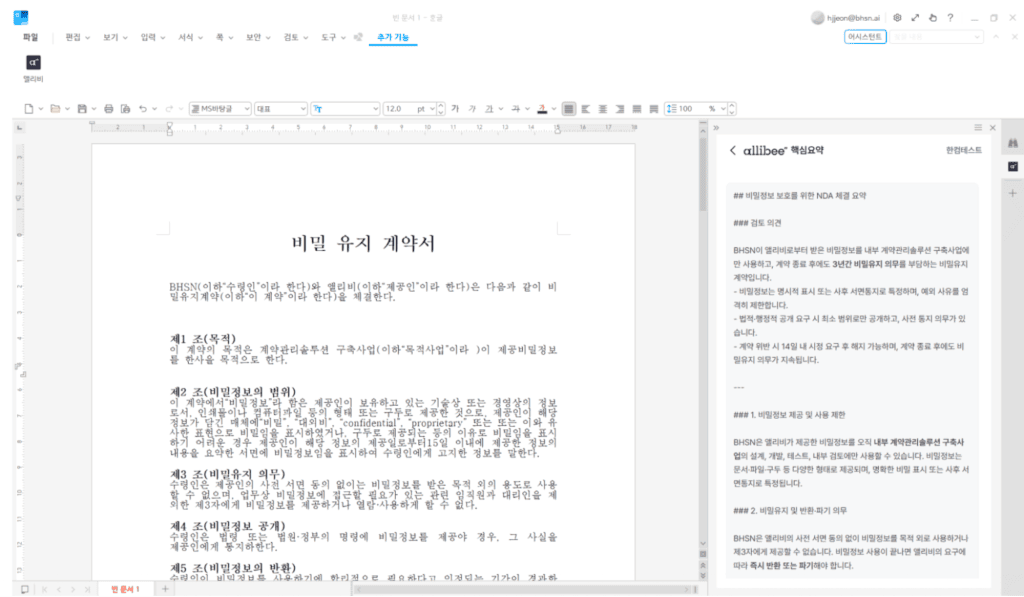
In the case of Allibee, developed by the legal-tech company BHSN, it analyzes the full text of the contract and organizes key terms such as parties, work, payment, and duration by category.
By using Allibee as an add-on within Hancom Office Hangul (HanAddons), you can directly paste the content organized in Allibee into your HWP document or use it as reference material.
This is useful for grasping a long contract at once or viewing multiple contracts in succession. However, a summary is meant for understanding the overall structure. You cannot judge whether each condition is favorable or unfavorable based on the summary alone.
Cross-Checking HWP Contract Review Results with the Original Text
If the summary helps you understand the structure, the review points out specific areas to examine in detail.
HanAddons Allibee Review shows whether each clause is met or unmet based on pre-set review criteria (playbooks). You can explore detailed features in the Allibee Product Guide.
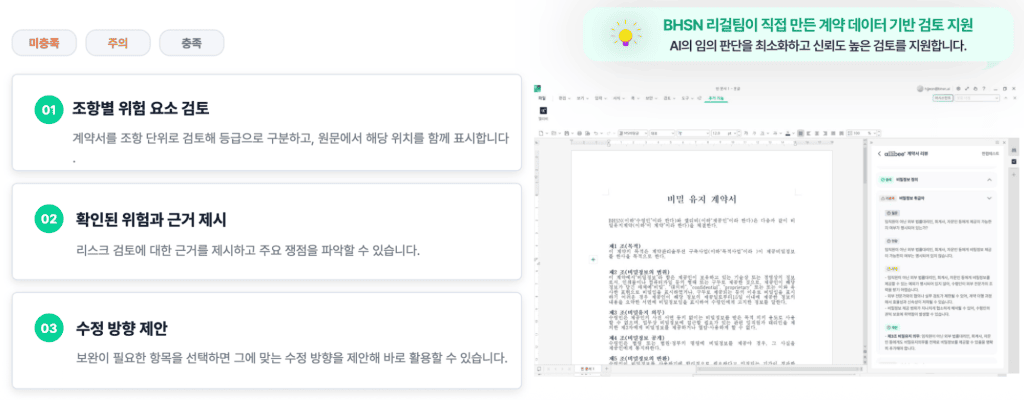
Reviewing HWP Contracts with Allibee Playbooks
Establishing Consistent Review Criteria with Allibee Playbooks
To trust the review results, you need to know where those judgments came from. Allibee reviews clauses based on criteria organized by BHSN’s legal experts according to contract type and the parties’ positions. This collection of items and criteria used for review is called a ‘playbook.’
Since it checks against the same standards, you can consistently verify items that are easy to miss, such as scope of work or inspection conditions, even when reviewing multiple contracts. However, if the transaction details change, the judgment may differ even for the same clause, and using a playbook does not guarantee the accuracy of the review results.
Distinguishing Legal AI Review Criteria from Company Transaction Policies
While review criteria look at general risks, your company’s transaction policy determines whether to accept those risks. For some transactions, quality inspection is more important than the delivery date, while for others, payment collection terms are more critical.
Therefore, a human must first read the risks pointed out by the AI and then decide whether to revise, negotiate, or accept them.
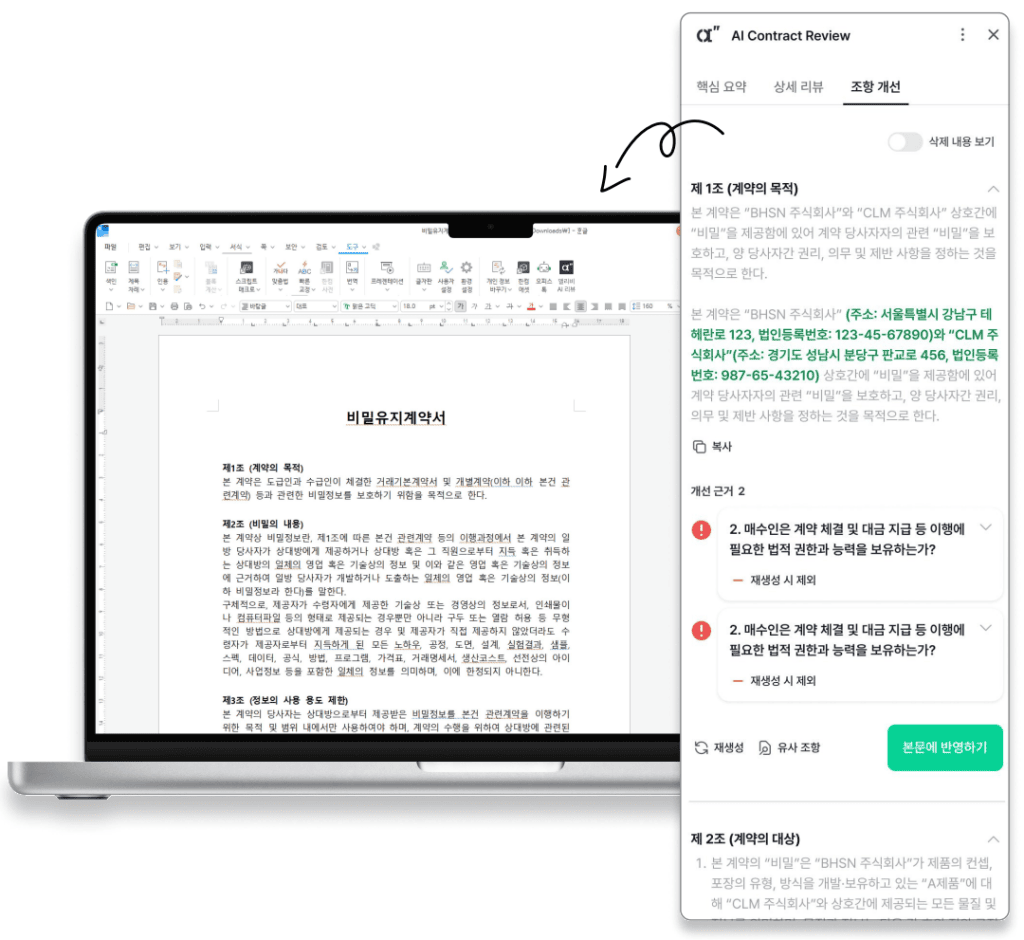
Cross-Checking Flagged Clauses from Contract Review AI with Original Evidence
Organizing Toxic Clause Review Findings into a Negotiation Memo
Once you have made a judgment, you must leave a record of the reasoning to use when negotiating with the other party. Before reflecting the suggested revisions from the review directly into the document, organize the original clause, the reason for the flag, revision considerations, evidence for verification, and the manager’s judgment into a memo.
Suppose you received the following phrasing while outsourcing the production of advertising content:
“The Performer shall perform all related tasks requested by the Client, and payment shall be made upon completion of inspection.”
| Review Memo | Content to Verify in a Hypothetical Situation |
|---|---|
| Original Clause | Perform all related tasks, payment after inspection completion |
| Points to Consider as Reasons for Flagging | The end of work and the timing of inspection completion may be understood differently by each party. |
| Revision Considerations | Specify types and quantities of deliverables, methods for negotiating additional work, inspection deadlines, and payment timing. |
| Evidence for Verification | Cross-check the work and payment clauses of the contract, the attached quote, and the details of the agreement between parties. |
| Manager’s Judgment | Do not fill in unagreed terms arbitrarily; reflect them only after negotiating with the other party. |
* The above content is a hypothetical example to explain an outsourcing contract. It is not an actual Allibee review result or legal advice.
This phrasing cannot be judged as illegal or something that must be deleted. However, the expression is open-ended. Start by looking at whether there is room for both sides to understand the scope of “related tasks” and the timing of “inspection completion” differently. If a revision is needed, it is better to narrow it down to conditions that both sides can actually fulfill rather than inserting expressions favorable to only one side.
Verifying Clauses Requiring Legal Interpretation via Original Text and Expert Review
It is difficult to judge legal interpretations based solely on review results. For clauses involving laws and regulations, check the enforcement date and the specific clause directly. For precedents, examine the facts and issues of the case together. However, since a precedent is a judgment made based on the facts of that specific case, the same conclusion may not necessarily apply to your transaction.
Request an expert review for clauses where the application is unclear.
👉 Check the Allibee introduction and connection guide on the HanAddons website
Checking Linked Clauses and Revised Versions After Service Contract Review
Cross-Checking Linked Clauses and Review Results After Contract Revision
Contract clauses are interconnected, so fixing one area can throw another out of alignment. If you postponed the delivery date, you must check if the inspection and payment dates can remain the same; if you reduced the scope of deliverables, you must see if the expressions for payment and usage rights followed suit. It also frequently happens that the main body is revised while the appendix still refers to the old content.
Dividing items to be revised into the following three categories clarifies who is responsible for what, speeding up negotiations.
- Factual Corrections: Items to be corrected using verification materials, such as party names, amounts, and dates.
- Term Negotiations: Items to be agreed upon with the other party, such as additional work, inspection, payment, and liability.
- Expert Verification: Items requiring separate judgment due to legal interpretation or the possibility of dispute.
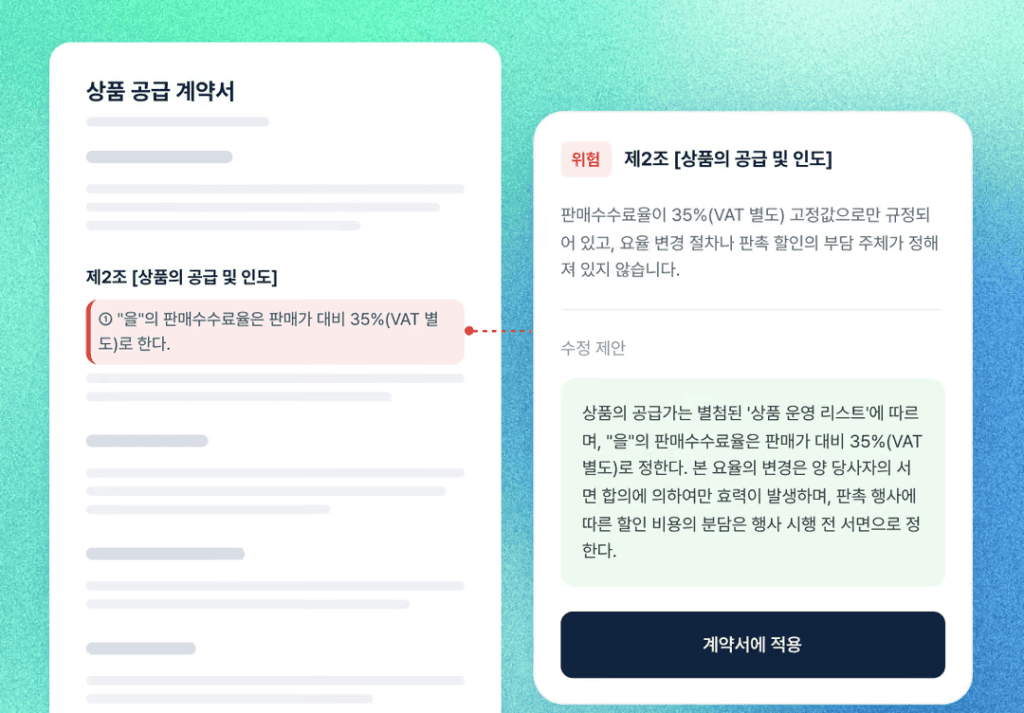
Proceeding with Negotiation and Approval After HWP Contract Review
For contracts requiring expert verification, it is safer not to stop at just tweaking the wording. This applies to contracts with a large scope of damages, complex ownership of rights, or where the existence of an employment relationship is an issue. AI review and summary are for reference only and do not replace a lawyer or legal counsel.
Once negotiations are finished, verify that all agreed-upon content is included in the revised version and keep the approved version separate.
Frequently Asked Questions Before Using HWP Contract AI
Do I need to move HWP contracts to another program?
By using HanAddons Allibee, you can write, summarize, and review contracts directly within HWP. Hancom Office 2024 Hangul 13.0.0.3379 or higher is required, and installation instructions can be found in the HanAddons Getting Started Guide.
Can I identify dangerous clauses just by reading the summary?
Use the summary to grasp the core content, and examine risk factors through the review and by cross-checking with the original text. Exceptional conditions or caveats omitted in the summary can have significant meaning in the actual contract.
Do I have to revise all clauses flagged by the AI?
Decide whether to revise, negotiate, or accept after checking the reasons for the flag and the transaction background. Even if you accept it, recording the reason for the judgment and the approver will be helpful for the next review.
Can I sign if no problems are found in the AI review?
A human must verify the actual agreement, amounts, dates, appendices, and whether revisions were reflected. For important legal issues, make a judgment after an expert review.
Can I log in to Allibee with a Hancom account?
Hancom accounts and Allibee accounts are not integrated. Allibee’s registration, pricing, and document processing terms follow the guidance of its operator, BHSN. When entering company documents, you must also comply with your organization’s policy on using external services.
Setting Review Items Before Utilizing Contract AI
The most common mistake in contract review is opening the AI review first. If you read the flags first, you will have no standard to determine if those items are truly a problem in this specific transaction.
Try changing the order. First, organize five things from the contract in your hand: scope of work, payment, schedule/inspection, rights/confidentiality, and liability/termination. Then, scan the whole thing with a summary and cross-check the clauses pointed out by the review with the original text. Finally, finish the review by separately noting what to correct, what to negotiate, and what to hand over to an expert.
Once you go through this sequence, you will spend less time wondering where to start with the next contract. Registration and terms of use can be found on the Allibee official site.
👉 Check out Allibee on the HanAddons website before your next contract review