HWP File Parsing Guide | Why Parsing Directly Without PDF Conversion Changes RAG Performance
HWP file parsing is rapidly emerging as a core preprocessing step for public-sector AI systems. The Ministry of the Interior and Safety passed a revision at a Cabinet meeting that mandates the use of open document formats that AI can read and use—expanding the requirement from central government ministries to local governments. Starting May 18, 2026, the HWPX-based open document system was also expanded to apply to local governments’ Onnara document system.
As the standard for public documents rapidly shifts toward HWPX, the accuracy of parsing HWP and HWPX files within a Retrieval-Augmented Generation (RAG) pipeline directly determines the quality of AI responses.
In this article, we’ll walk through parsing approaches, their impact on RAG performance, and solution selection criteria in order.
What is HWP file parsing?
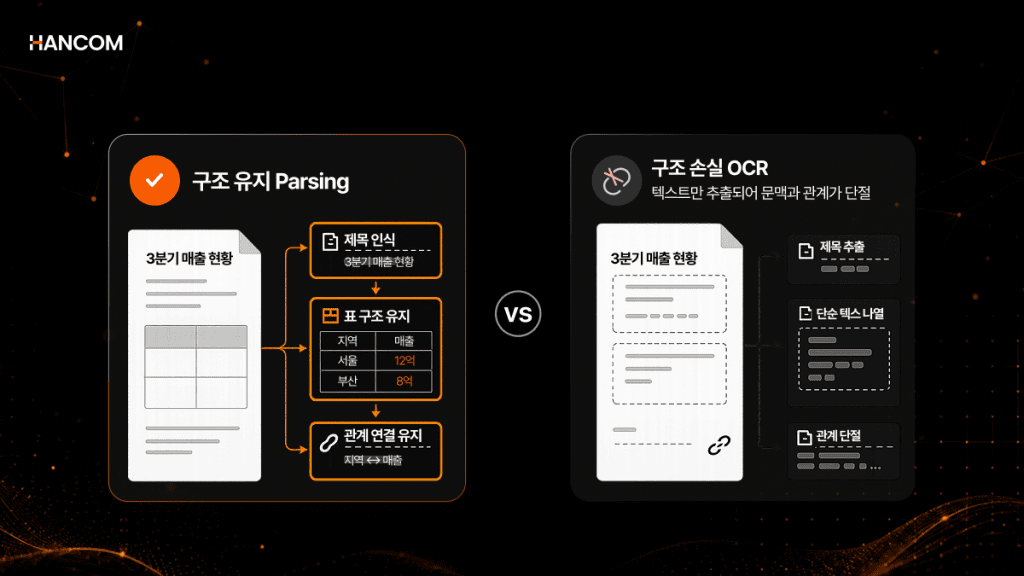
HWP file parsing is the process of converting text, tables, images, and paragraph hierarchy in HWP/HWPX documents into structured data that AI can read. In RAG, the output becomes the input for chunking, embedding, and retrieval—so if parsing is inaccurate, accuracy drops in the subsequent stages as well.
Why is HWP/HWPX parsing difficult?
Because HWP/HWPX are Hancom’s proprietary formats, it’s difficult for general-purpose parsers built for PDF/DOCX to fully read their structure. The two formats also differ internally: HWP is Hancom Office’s legacy binary-based format, while HWPX is a ZIP + XML-based format introduced in 2010 and made the default save format starting in 2021.
That’s why a parser must handle each format separately. However, both formats share a common limitation: there is no universal parser, so if you only extract text, table positions, footnotes, and paragraph hierarchy disappear.
This issue is even more pronounced in structured documents like public-sector documents, which contain many numbering schemes and tables. The open-source pyhwpx runs only on Windows environments where Hanword is installed, making it unsuitable for Linux servers or air-gapped networks. And major LLM frameworks such as LangChain do not provide a standard HWP/HWPX loader, so you must build a custom parsing pipeline.
How is HWP file parsing related to RAG usage?
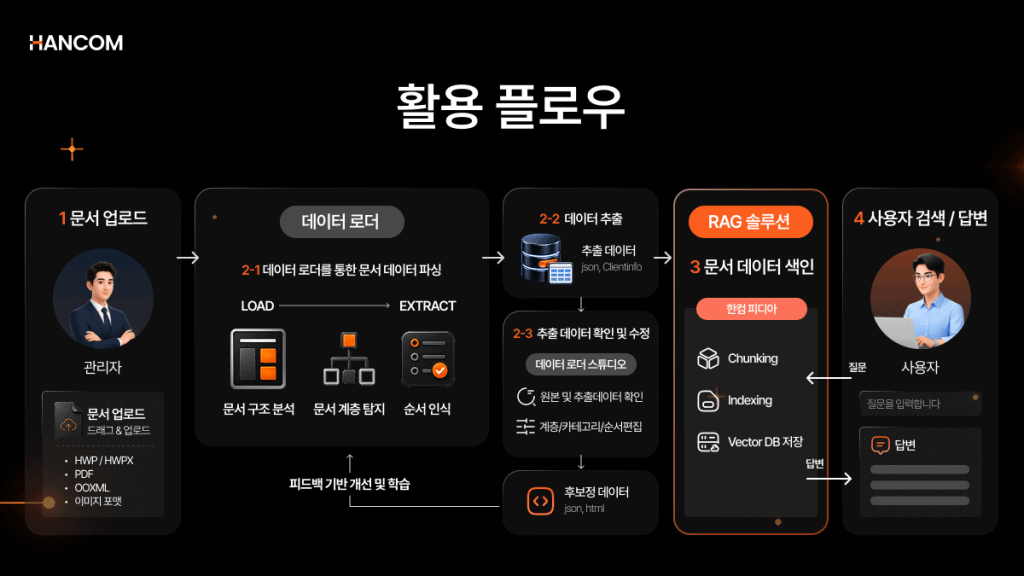
Because RAG processes documents in the order of parsing → chunking → embedding → retrieval → generation, the parsing output becomes the input for every subsequent stage, and parsing quality sets the upper bound of RAG performance. AWS describes RAG as a three-step process—Retrieve, Augment, Generate—and the data used in the first step (retrieval) must be structured for context to carry through to the answer stage.
If structural information is lost during parsing, the impact cascades through later stages. Misparsed documents lead to misaligned chunk boundaries, and those chunks can reduce embedding and retrieval accuracy.
Because the “Garbage In, Garbage Out” principle applies as-is, it’s important to check parsing quality before trying to improve the model.
Table summarizing how HWP file parsing quality affects each RAG stage
| Stage | Role | Impact |
| Parsing | Convert documents into structured data | Must preserve hierarchy and tables |
| Chunking | Split into retrieval units | Determine semantic boundaries |
| Embedding | Convert to vectors | Mixed-up chunks distort meaning |
| Retrieval | Find relevant evidence | Missing tables/conditions increases the risk of wrong answers |
| Generation | Write the answer | Inaccurate evidence triggers hallucinations |
Comparison of two HWP file parsing methods
There are two main ways to parse HWP/HWPX files: converting HWP/HWPX to PDF and then processing it, or extracting data directly from the original file. Even if a product claims “HWP support,” it may actually convert to PDF internally—so you must verify the processing method.
Comparison table by HWP file parsing approach
| Category | Parse after PDF conversion | Direct Original Parsing |
| Processing | Convert HWP → PDF, then parse the PDF | Directly analyze the HWP/HWPX structure |
| Structure preservation | Hierarchy/tables may be lost | Better at preserving the original structure |
| Tables/footnotes/equations | Prone to breaking during conversion | Interpreted based on the original |
| RAG Utilization | Chunk boundaries may become unclear | Better for semantic chunking |
| Security | Must verify dependency on conversion tools | Can be designed for internal-network processing |
Process and limitations of parsing after PDF conversion
Parsing after PDF conversion converts HWP/HWPX to PDF and then extracts text with a PDF parser, so tables may be treated like images or paragraph order may change during conversion.
According to Hancom Tech’s test results, extracting directly from HWPX (9.5 seconds) versus converting to PDF and then extracting (150.3 seconds) takes about 15.8× longer. Beyond speed, conversion also causes data loss, such as table structures being completely compromised or objects and images being omitted.
Because PDF is a format that stores content based on where text is placed on the screen rather than its meaning, the comparative study of PDF parsing tools also identifies preserving word order, paragraph integrity, and table extraction as major challenges.
Process for direct parsing of original HWP files
Direct parsing of original HWP/HWPX extracts data by analyzing the file’s binary/XML structure directly, without converting to PDF. With no conversion step, hierarchy, tables, and formatting are preserved as-is, and there are fewer points where structural loss can occur. However, implementing this approach requires core technology for the HWP/HWPX formats, so you must verify that the solution truly reads the original files directly.
For HWPX, you must reconnect content, settings, and metadata that are split across multiple files to restore the structure—implementing this requires core technology for the HWP/HWPX formats themselves. Hancom Data Loader parses originals directly without PDF conversion using an HWP/HWPX SDK built on Hancom’s 30 years of technology.
How does the HWP file parsing approach affect RAG performance?
The parsing approach directly affects RAG retrieval accuracy. If structure is damaged by PDF conversion, chunking quality drops—and that damage also reduces embedding and retrieval accuracy.
Types of structural loss that occur during PDF conversion
Structural loss from parsing after PDF conversion appears in three forms—loss of hierarchy, table structure collapse, and missing images/charts. All occur at the parsing stage and are difficult to recover later.
- Loss of hierarchy: The hierarchy of titles, clauses, and sub-items is flattened, throwing off chunk boundaries.
- Table structure collapse: Row and column relationships in merged cells and multi-level headers are damaged, causing numerical values and conditions to be scattered.
- Missing images and charts: Visual information that is not converted into text is excluded from the retrieval scope.
In the document parsing survey study published by a joint research team from the Shanghai AI Lab and Peking University, key components such as layout detection and table/formula recognition are systematically organized, and the study explains that these outputs form the foundation for downstream tasks such as knowledge base construction and RAG.
Why parsing quality determines RAG retrieval accuracy
Parsing output is the input to chunking, and chunking output is the input to embedding—so if structure is damaged during parsing, incorrect chunks are stored in the vector DB and wrong answers appear at the retrieval stage.
The RAG study reported that a system equipped with a structure-aware parser produced better answers on about 47% of questions compared to the baseline, tied on 38%, and underperformed on only 15%. (This experiment is based on an in-house comparison using the ChatDOC system.) Checking the parsing structure before swapping models or embeddings offers much higher cost-effectiveness.
Checklist: What to verify when choosing an HWP file parsing solution
You should first narrow down HWP/HWPX file parsing solutions using four criteria: support for direct parsing of originals, DLA (Document Layout Analysis) and hierarchy extraction, TSR (Table Structure Recognition), and support for secure environments.
HWP file parsing solution selection checklist
✅ Does it support direct parsing of original HWP/HWPX files?
✅ Can it perform DLA and extract hierarchy?
✅ Does TSR handle merged cells and nested tables?
✅ Can it process documents on an internal network without sending them externally?
The key is not “Can it open the file?” but “How well does it preserve tables, footnotes, and hierarchy?” Even if the spec says “HWP supported,” some solutions convert to PDF internally. If even one of the four criteria is missing, you’ll hit a bottleneck in the RAG preprocessing stage. The most reliable approach is to test with real business document samples and directly verify how well tables and hierarchy are preserved.
Whether it supports direct parsing of original HWP/HWPX files
Many solutions labeled “HWP/HWPX supported” actually use a PDF-conversion workaround, so you must confirm whether it’s direct parsing of originals or parsing after conversion. If you detour through PDF, tables may be treated as images, making table structure recognition itself difficult.
When verifying, check whether it reads HWP 3.0+ and HWPX directly, and whether tables and hierarchy are preserved in real business document samples. Ultimately, direct parsing capability depends on whether the vendor has core technology for the HWP/HWPX formats. Because solutions with core HWP/HWPX SDK technology are rare, checking this criterion first is the fastest way to narrow your options.
DLA and hierarchical structure extraction
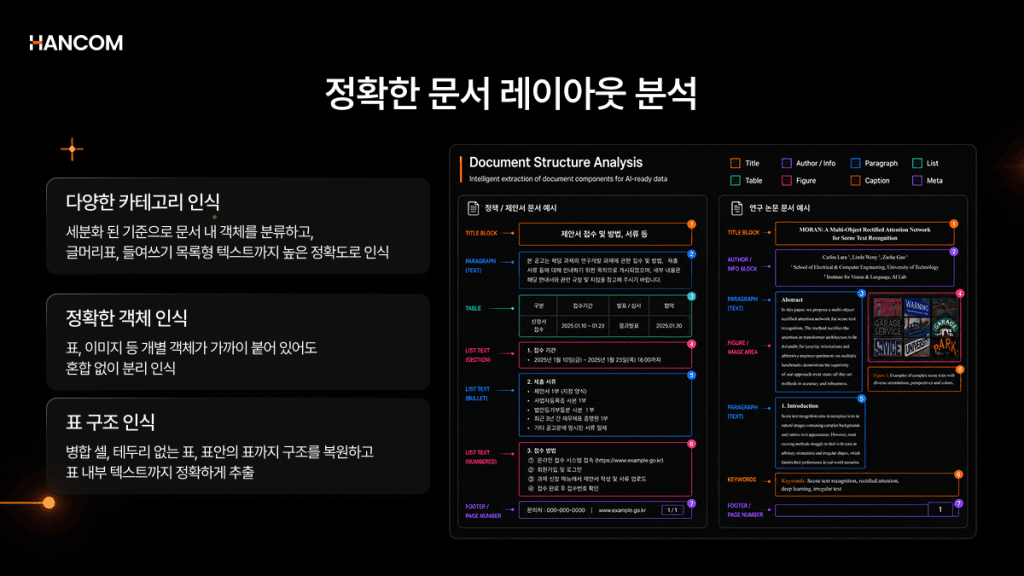
DLA and hierarchy extraction are key requirements for improving RAG chunking quality.
This capability automatically distinguishes text, table, and image regions across the full document layout, and it serves a different role than OCR (Optical Character Recognition), which reads characters. With OCR alone, multi-column layouts, tables, and captions can be extracted in a mixed order. Without hierarchy extraction, you’re forced to rely on fixed-size chunking, which limits RAG performance.
Korean official documents and statutes often use indentation-based hierarchies, which are difficult to process without dedicated recognition. Hancom Data Loader supports both DLA and hierarchy (Level) recognition, ensuring these hierarchical structures are captured as well.
Scope of table structure recognition
For TSR, you should verify whether it handles merged cells, multi-level headers, borderless tables, and even nested tables. If row and column relationships in a table are damaged, the LLM is more likely to misinterpret figures and conditions.
There are even benchmarks that evaluate table recognition across two dimensions—cell content accuracy and cell position accuracy—showing that preserving positional relationships determines whether it’s usable in real work.
Public-sector documents contain many complex tables, so practical usability depends on how well table structure is recognized. Hancom Data Loader uses TSR to convert even borderless tables, merged cells, and nested tables into Markdown while preserving row/column structure at the cell level.
How to support secure environments
Public, financial, and legal organizations must verify whether documents can be processed on an internal network without being sent to an external cloud. In network-segregated environments, whether on-premises deployment is supported determines feasibility.
Security environment checks before adopting HWP parsing
✅ Is the original document transmitted externally?
✅ Can it be installed on an internal/air-gapped network?
✅ Can it integrate via a container-based REST API?
✅ Do the OCR/DLA/TSR engines run without relying on external APIs?
If even one of these four items is not met, you may face situations where documents leak externally or adoption becomes impossible. In particular, it’s hard to confirm from specs alone whether the OCR/DLA/TSR engines operate independently within an internal network, so it’s important to verify the technical architecture directly in an actual air-gapped environment.
If you are looking for a solution that meets all four of these criteria, you can check out Hancom Data Loader.
HWP/HWPX File Parsing—Solved with Hancom Data Loader
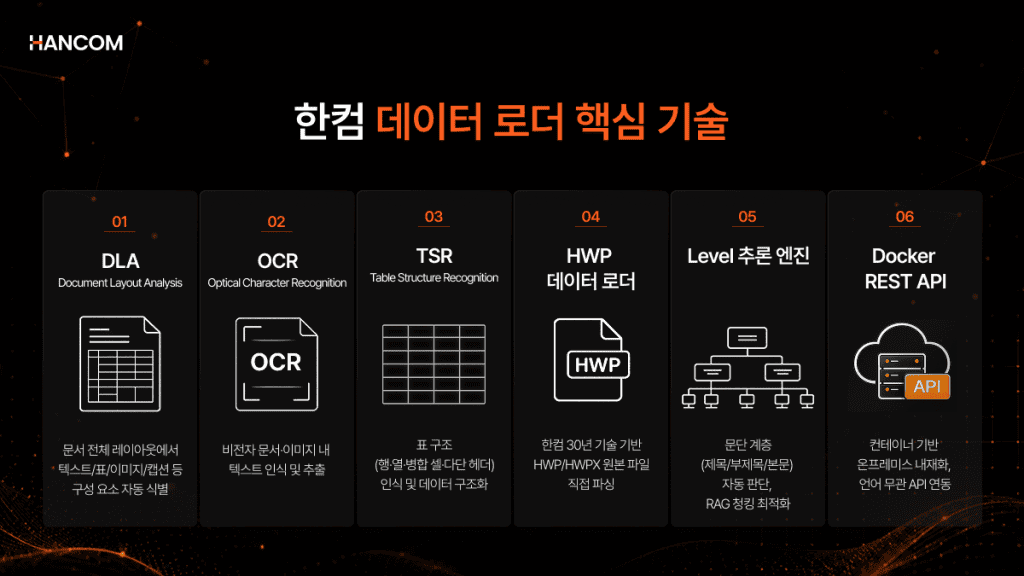
How to minimize structural loss with direct parsing of original HWP files
Hancom Data Loader extracts data directly from original files using core HWP/HWPX SDK technology, and interprets layout elements—such as track changes, footnotes, endnotes, equations, and bullets—based on the original. It supports a wide range of HWP versions and recognizes diverse layout elements.
Improving RAG Chunking Quality with DLA and Hierarchical Structure Extraction
Chunks that preserve hierarchy improve both retrieval accuracy and the quality of answer evidence. Hancom Data Loader uses DLA to identify text, table, image, and caption regions, and automatically tags hierarchy levels by analyzing paragraph styles, indentation, and numbering schemes with its Level inference engine. It is optimized for recognizing the indentation-based hierarchical structures unique to Korean official documents, statutes, and reports.
How to fully extract even merged cells and nested tables with TSR
When numbers and conditions inside tables are structurally preserved, they can be used directly in RAG retrieval. Hancom Data Loader’s TSR converts even borderless tables, merged cells, and nested tables into cell-level row/column Markdown.
💡 If you want to see the results first—how tables and hierarchy are actually extracted from HWP/HWPX documents—you can check it out directly in the live demo.
👉 Go use the Hancom Data Loader live demo
How to apply HWP parsing in an on-premises environment
Even in network-segregated environments, you can process documents without sending them outside. Hancom Data Loader is embedded into internal networks as a container-based REST API, enabling operation in public, financial, and legal security environments without external document transfer. Hancom Data Loader is not an end-to-end RAG answer system; it handles document preprocessing, and the retrieval/Q system can be built in conjunction with Hancom’s RAG solution, Hancom Pedia.
HWP file parsing: Frequently asked questions
Can’t I convert an HWP file to PDF and feed it into RAG?
During conversion, tables may be treated as images and hierarchy may be flattened, making structural information easy to lose. It can also take about 15.8× longer than direct parsing, so if you need to preserve tables, footnotes, and hierarchy, direct parsing of the original is more reliable.
Is there an HWP parsing solution that can be used in an air-gapped network?
Check whether on-premises deployment is supported and whether the OCR/DLA/TSR engines run on the internal network without external APIs. Hancom Data Loader can be installed and operated on an internal network via a container-based REST API.
Is parsing HWP and HWPX equally difficult?
HWP is a binary container, while HWPX is ZIP- and XML-based, so the approaches differ. However, for both formats, extracting only text causes table and hierarchy information to disappear, so restoring the original structure is equally necessary. That’s why direct parsing of originals is the safer choice regardless of format.
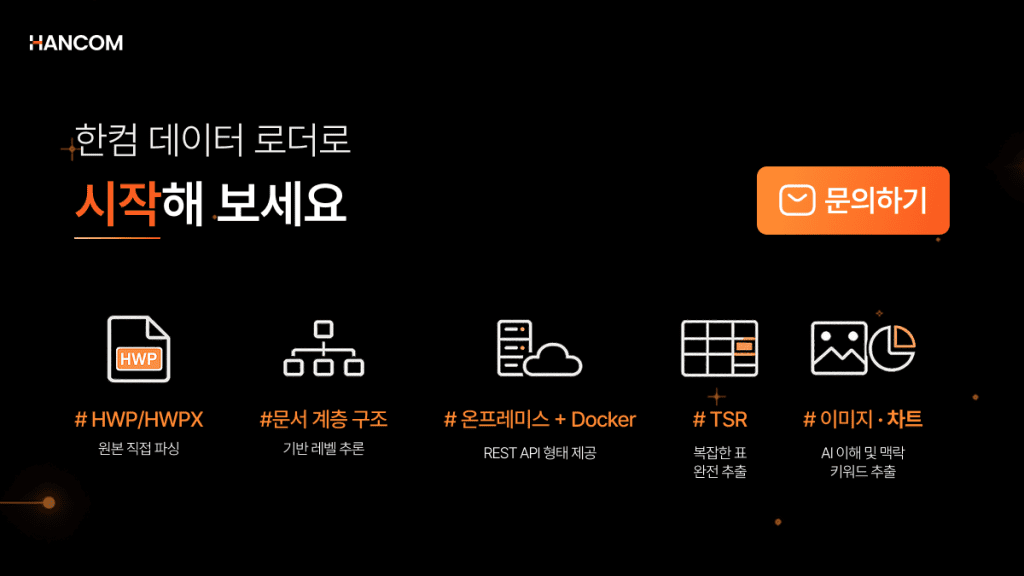
Get started with HWP/HWPX file parsing with Hancom Data Loader
Structural loss that occurs during HWP/HWPX parsing cascades through chunking, embedding, retrieval, and generation—and cannot be restored at any later stage. Many organizations blame RAG quality issues on the LLM or embeddings, but in most cases the real bottleneck is the parsing stage.
Parsing is not the process of “opening” a document—it is the process of designing the ceiling of overall RAG performance. How you extract data structurally determines chunk boundaries, retrieval accuracy, and final answer quality. This gap becomes even larger for complex, Korea-specific documents like HWP/HWPX.
You can resolve the burden of document preprocessing and structure loss all at once with Hancom Data Loader.
🖥 Hancom Data Loader
Hancom Data Loader is a document parsing solution that converts HWP, HWPX, PDF, and OOXML into structured data. The extracted data can be integrated with Hancom’s own RAG solution, Hancom Pedia, to extend capabilities to retrieval and answering. You can start reliable document preprocessing with Hancom Data Loader.
👉 View the Hancom Data Loader API Guide
👉 Inquire About Hancom Data Loader
References
- ZDNet Korea, “Public documents to mandate ‘HWPX’ from the 18th…Transition to an AI-friendly administrative system,” 2026
- Hancom Tech, “Hanword document file format: Parsing the HWP format with Python (2),” 2025
- Hancom Tech, “Korean documents for the AX era: Analysis of the open-source ecosystem status and activation strategies,” 2025
- AWS, “What is Retrieval-Augmented Generation (RAG)?”
- arXiv, “Retrieval-Augmented Generation for Knowledge-Intensive NLP Tasks,” 2020
- arXiv, “A Comparative Study of PDF Parsing Tools Across Diverse Document Categories,” 2024
- arXiv, “Document Parsing Unveiled: Techniques, Challenges, and Prospects for Structured Information Extraction,” 2024
- arXiv, “Revolutionizing Retrieval-Augmented Generation with Enhanced PDF Structure Recognition,” 2024
- Unstructured, “Introducing SCORE-Bench: An Open Benchmark for Document Parsing,” 2025
- Google Cloud, “Document parsing and chunk processing,” 2026
- Microsoft Learn, “Choose the right Azure AI tool for document processing,” 2026