What is a RAG Pipeline? A Complete Guide from AI Hallucinations to Components
What if we were to introduce an AI chatbot to our company?
Recently, there has been an increase in discussions within companies about introducing AI into internal operations. In practice, it is quite useful for summarizing documents, drafting emails, and organizing reports.
However, when you try to make it answer based on company regulations, product manuals, and internal reports, you run into problems.
When asked about the latest amendments, it might state non-existent content or fail to find information that is clearly in the document. This phenomenon is called AI hallucination.
Generative AI can create plausible-sounding answers even for information it hasn’t learned. In particular, internal documents such as company regulations, product manuals, and reports are difficult to use as a basis for answers unless they are separately connected. RAG (Retrieval-Augmented Generation) is a method that compensates for this limitation.
RAG is a technology that searches internal documents and then generates answers based on evidence. Let’s summarize what RAG is and what stages the RAG pipeline consists of.
What is RAG? – Limitations of LLMs and Why RAG Emerged
What is AI Hallucination? Why do LLMs make things up?
Hallucination is a term used to describe the phenomenon of seeing or hearing things that do not actually exist, but in the field of LLMs, it refers to the phenomenon where a model generates content that is not based on training data or the provided context.
The reason AI hallucinations occur is related to the structural limitations of LLMs. First, because LLM training data is fixed at a specific point in time, they inherently cannot know about subsequent amendments to laws, internal guidelines, or product policies.
Furthermore, private documents that exist only within a company, such as corporate contracts, product specifications, and security guidelines, were not part of the initial training.
As a result, for questions requiring the latest information, such as 2026 regulations, it may answer based on old standards, or for questions that must be based on internal documents, it may state non-existent content as fact. This is exactly why companies need RAG when introducing AI chatbots into their operations.
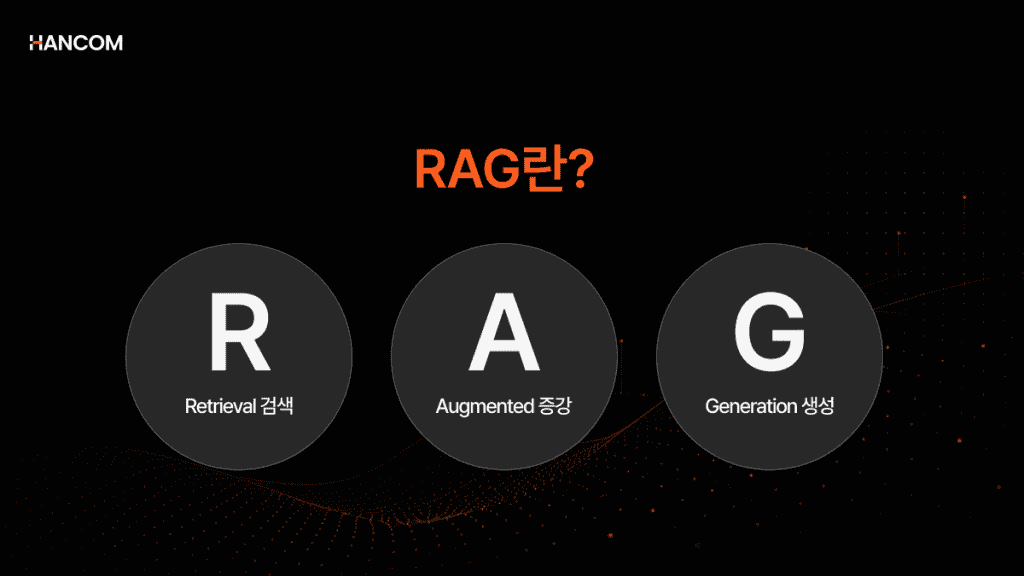
RAG (Retrieval-Augmented Generation) Concept and Pronunciation
RAG is a process where a Large Language Model (LLM) searches external documents in real-time to find relevant information before generating an answer, and then generates a reliable response based on that content.
Simply put, RAG is a method that reduces AI hallucinations by having the AI first search external or internal documents related to the question and then answering based on verified evidence.
For reference, RAG is pronounced in various ways. Overseas, it is pronounced as [rag], while in Korea, it is sometimes pronounced as [R-A-G].
Comparison Table: LLM vs. RAG
The difference between a traditional LLM and RAG lies in whether it ‘searches and utilizes relevant documents as evidence‘ before answering.
| Category | LLM Standalone Method | RAG-based Method |
| Basis for Answer | Focused on trained data and the input question | Focused on external and internal documents related to the question |
| Information Scope | Difficult to reflect information or internal materials after the training point | Can reference the latest documents and internal materials together |
| AI Hallucination | Plausible but incorrect answers may occur if evidence is lacking | Can reduce risks by answering based on verified evidence |
| Information Update | Requires retraining or separate input to reflect new information | The knowledge base can be updated simply by replacing or adding documents |
🔗 If you want to learn more about RAG: [What is RAG Data Preprocessing? A Guide to Document Preprocessing that Determines AI Answer Quality]
Why RAG is Necessary for Building In-house AI Chatbots
By utilizing RAG, companies can reflect their internal documents or the latest information in AI answers. This allows for the implementation of generative AI functions tailored to corporate tasks in a relatively short time and at a low cost, without having to retrain a large-scale model separately.
The role of RAG is even more critical for services used in actual work, such as in-house AI chatbots. This is because answering based on information that varies by company—such as internal policies, security guidelines, and product manuals—can reduce the risk of providing inaccurate guidance or outdated information.
If an AI chatbot provides incorrect information plausibly, it can lead beyond a simple wrong answer to customer service errors or professional liability issues.
In fact, one airline was held liable for customer compensation after its chatbot incorrectly explained the bereavement discount fare policy.
The RAG Pipeline Construction Process
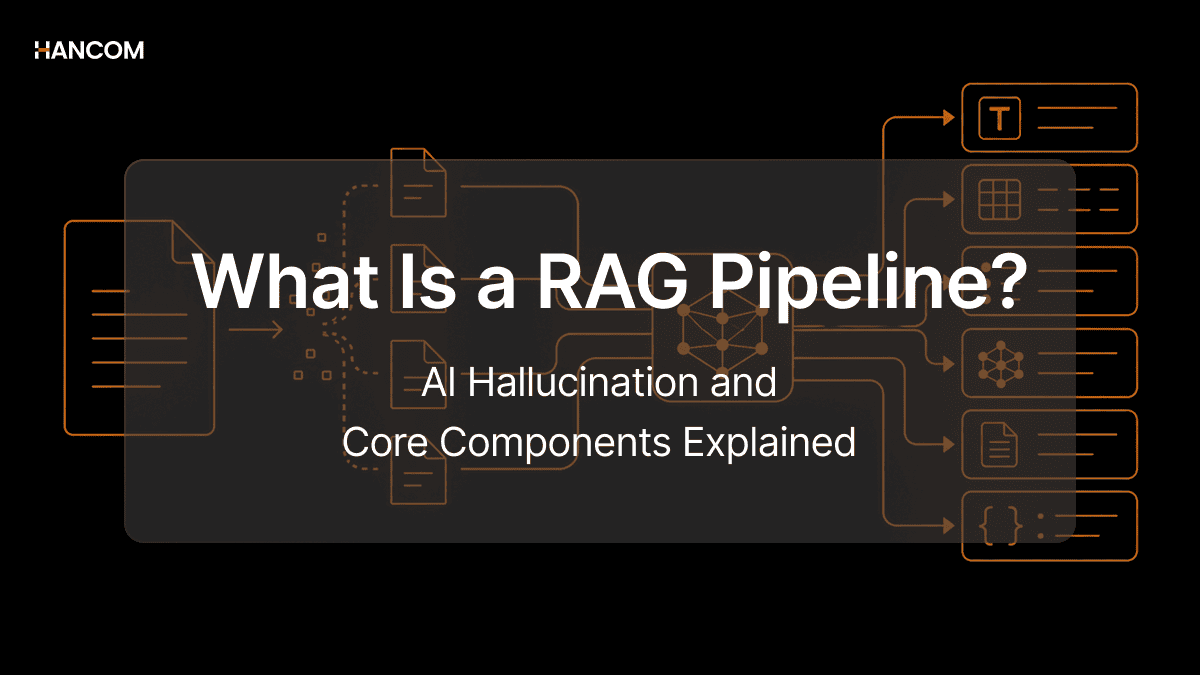
A RAG pipeline is a step-by-step structured processing flow that involves processing and storing documents in a form that the AI can search, and then finding relevant documents to generate an answer when a question is received.
RAG is moving beyond a simple technical concept to become a standard way for AI to search and utilize actual business documents. In fact, the National Assembly has built a RAG-based big data platform to search and utilize vast amounts of HWP documents using AI.
The RAG pipeline is divided into two sections: the offline stage (Steps 1–5), which prepares in advance before a question, and the online stage (Steps 6–7), which operates in real-time when a question is received.
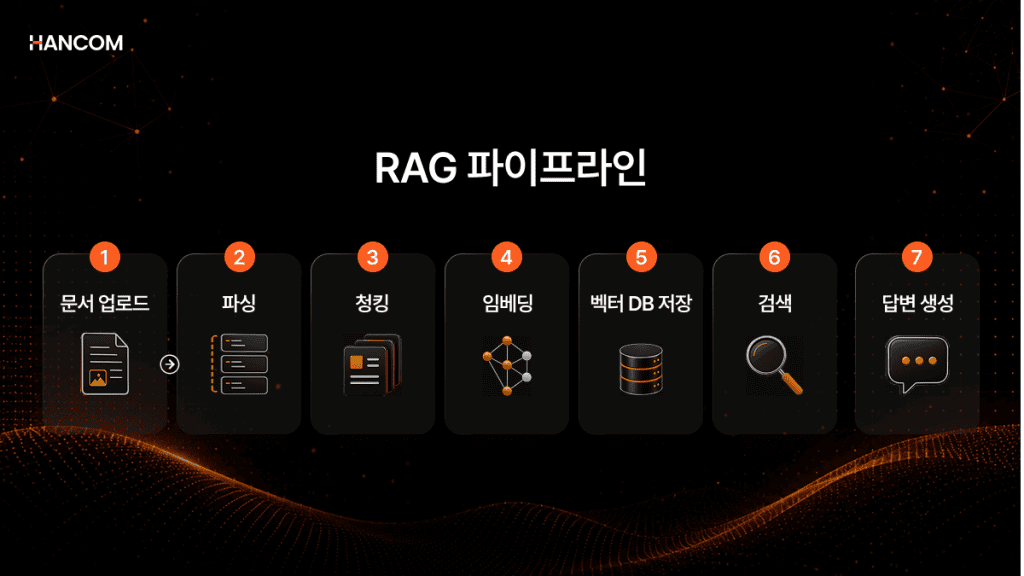
Step 1 – Document Upload (Document Loader)
This is the stage where documents for the AI to reference, such as PDF, HWP, HWPX, OOXML, and web pages, are loaded into the RAG system.
I have introduced RAG, but the answer quality is low. How do I fix it?
Step 2 – Parsing
This is the stage where text, tables, and title/body structures are extracted from the loaded documents and organized into a form that the AI can process. This process is called parsing.
While PDF, HWP, and HWPX files are easily readable by humans, it is difficult for an AI system to understand the document structure immediately.
Scanned PDFs may be treated like images, and documents with proprietary formats like HWP and HWPX may require a separate interpretation process.
It’s not just about extracting characters; you must extract the relationships between rows and columns in tables, as well as the hierarchical structure of titles and body text, so that the AI can understand them correctly in the next stage.
For example, let’s say there is a budget table.
When information like “Q1 Marketing Budget: 200 million KRW” is in a table, if parsing is not done correctly, it is difficult for the AI to grasp the relationship that “Q1” and “200 million KRW” are related items. Even if it reads the figures, it’s hard to distinguish which item the number belongs to.
Therefore, accurate parsing is essential to utilize the meaning of the document more reliably in the subsequent chunking, embedding, and retrieval stages.
🔗 What is parsing? [Complete Summary of Data Parsing Concepts – Understanding easily from meaning to process]
Step 3 – Chunking
This is the process of dividing parsed documents into small units that are easy for the AI to search. If you input a hundred-page document as a whole, there is too much information, making it difficult for the AI to find the exact content needed. Chunking is the task of increasing search accuracy by dividing long documents into meaningful pieces, or ‘Chunks’.
Chunking strategies vary depending on the document and purpose. Representative methods include the fixed-size method, which cuts based on character or token count; the semantic-based method, which divides based on where the content changes; and the recursive method, which applies delimiters like titles, paragraphs, and sentences in order to preserve context as much as possible.
However, regardless of the strategy, good chunking starts with parsing that accurately preserves the document structure. This is because the titles, paragraphs, and table hierarchies of the document must be accurately extracted in the previous stage for the AI to divide them into meaningful units that are easy to search.
Step 4 – Embedding
This is the stage where chunked text pieces are converted into vectors, which are arrays of numbers. Instead of comparing text directly, the AI calculates the similarity between vectors converted into numbers to find content with close meanings.
The core of embedding is semantic search.
For example, this is why when you search for “car repair costs,” you can find it even if the document says “vehicle maintenance expenses.” This is because even if the expressions are different, if the meanings are close, they are placed in similar positions in the vector space.
However, search quality is not determined by the embedding model alone. If parsing and chunking are inaccurate in the previous stages, context may be cut off or semantic units may become awkward before being vectorized. In this case, even if a good embedding model is used, there may be limits to accurately finding the information the user wants.
Step 5 – Vector DB Storage
This is the stage where converted vectors are stored and managed so they can be searched quickly when needed. A vector DB is not designed to store the text itself and find exact word matches, but rather to search for data with high similarity based on the embedded vectors.
For example, if a user searches for “marketing budget,” that question is also converted into a vector. Then, the vector DB compares it with the stored document vectors to find content that is semantically close. So, even if different expressions like “advertising costs” or “promotion expenses” are used in the document, they can be included in the search results if they are highly relevant in context. Representative vector DBs include ChromaDB, Pinecone, and Milvus.
This concludes the offline stage of collecting documents in advance and preparing them in a searchable form. Now, when a user enters a question, the online stage begins.
Step 6 – Retrieval
When a user enters a question, the system converts that question into a vector and then retrieves the document pieces with the closest meaning from the vector DB. The component responsible for this role is the Retriever.
The performance of the retriever is heavily influenced by the quality of the preceding parsing, chunking, and embedding.
If documents with broken parsing, chunks with lost meaning, or incorrectly converted vectors accumulate, the retriever may bring back irrelevant pieces no matter how sophisticated it is. LangChain provides a retriever-based RetrievalQA chain to help connect this process into a single pipeline.
Step 7 – Answer Generation
When the document pieces found by the retriever and the user’s question are combined and passed to the LLM, the LLM generates the final answer based on that content. While the LLM would have answered based only on training data without RAG, in this stage, it is structured to answer by referencing actual documents.
However, LLMs formulate responses based on the content they are given. If incorrect document fragments are passed from a preceding stage, the response quality will suffer, no matter how high the LLM’s performance. In a RAG pipeline, the LLM is the final stage, and errors occurring in earlier stages are directly reflected in the final answer.
Main Causes of RAG Pipeline Construction Failure – The Need to Check the Parsing Stage
If you have introduced RAG but the answer quality falls short of expectations, it is necessary to first check the parsing stage before the LLM or retriever.
If table structures are lost during the parsing stage, chunking units become disorganized, embedding quality decreases, and the retriever may bring back irrelevant document pieces. Ultimately, the LLM has no choice but to generate an answer based on incorrect evidence. Since a pipeline is a structure where each stage is connected, quality issues at the front end affect all subsequent stages.
Why do general parsers have limitations with HWP and HWPX?
In the Korean public, financial, and legal sectors, HWP and HWPX documents are predominant. However, many global parsing solutions do not support HWP/HWPX or only support limited features. To solve this, some use a workaround of converting HWP/HWPX to PDF before parsing.
However, in this process, footnotes, merged cells, multi-column structures, and hierarchical information are often lost. Data that has lost its structure affects the chunking and embedding processes.
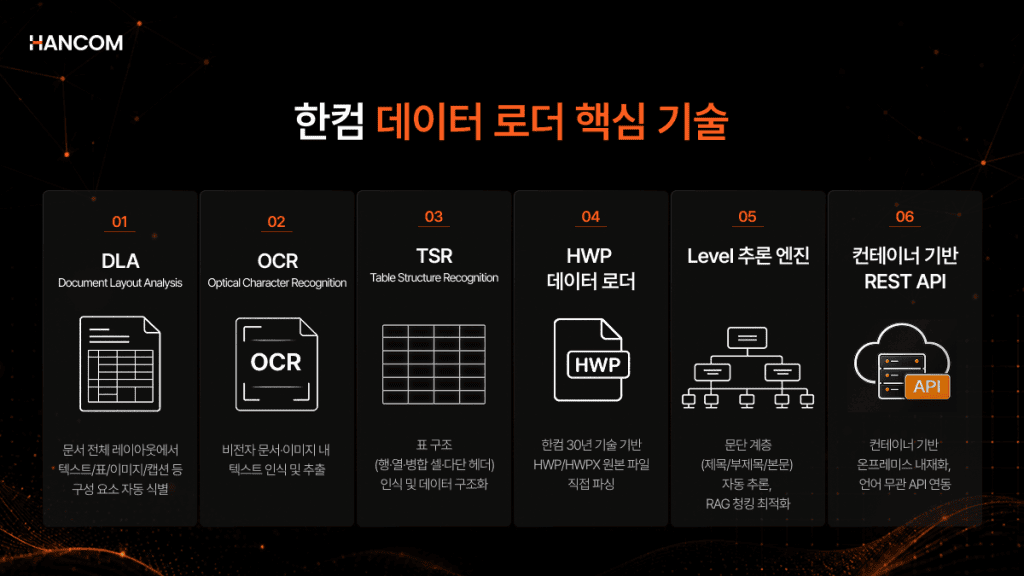
The Start of RAG Pipeline Construction: Hancom Data Loader Document Parsing Solution
🖥️ Hancom Data Loader
Hancom Data Loader is a document parsing solution that converts various document formats, such as HWP, HWPX, PDF, and OOXML, into structured data. It is based on Hancom’s 30 years of core technology and can directly parse original HWP and HWPX files—which are key formats for public institutions—without PDF conversion.
Direct Parsing of Original HWP/HWPX – Maintained Without PDF Conversion
HWP and HWPX are proprietary formats optimized for the Korean business environment, so if they are converted to PDF for parsing, key formatting such as footnotes, merged cells, and hierarchical structures are lost. Hancom Data Loader extracts data directly from the original HWP/HWPX files without this conversion process. It recognizes various layout elements such as footnotes, endnotes, formulas, track changes, and merged cells without loss.
Combined DLA, OCR, and TSR AI – Preserving Tables and Document Hierarchies
Document Layout Analysis (DLA) identifies the flow of the main text exactly as a person would read it, even in complex documents like two-column layouts. Table Structure Recognition (TSR) restores the relationship between rows and columns within a table and outputs it as structured data. Because it recognizes borderless tables, merged cells, and nested tables, it can distinguish whether the same figure is data within a table or a description in the main text. Optical Character Recognition (OCR) even extracts text contained within images.
For a RAG pipeline to function correctly, the data delivered to the AI must be accurate from the outset. Parsing is the first step in this process, and the quality of parsing directly impacts the overall pipeline performance.
Are you worried about the parsing quality of HWP, HWPX, PDF, or OOXML in the RAG you are currently building? Experience it immediately without any installation process in our Live Demo.
👉 Try Hancom Data Loader with Your Document
👉 Inquire About Hancom Data Loader Implementation
Frequently Asked Questions (FAQ) about RAG Pipelines
Q1. What stages are required to create a RAG system?
It consists of a total of 7 stages: Document Upload → Parsing → Chunking → Embedding → Vector DB Storage → Retrieval → Answer Generation. It is divided into an offline stage (Steps 1–5) for processing documents before a question, and an online stage (Steps 6–7) that operates in real-time when a question is received. The quality of the initial stages determines the performance of the entire pipeline.
Q2. Why is document parsing important in a RAG system?
If table structures or document hierarchies are lost during the parsing stage, quality will deteriorate sequentially through the chunking, embedding, and retrieval stages. For example, if the relationship in table data like “Q1 Marketing Budget: 200 million KRW” is broken during parsing, the AI will find it difficult to distinguish which item the information describes, even if it reads the same figure.
Q3. We implemented RAG, but the answer quality is low. How can we fix it?
Before replacing the LLM or retriever, you must first check the parsing stage. Since a RAG pipeline is a structure where each stage is connected, the loss of table structures or missing hierarchical information in the parsing stage leads to quality degradation in all subsequent stages: chunking, embedding, and retrieval.
References
- NVIDIA, “RAG 101“
- Wikidocs, “From Introduction to Application of LangChain“
- AWS, “What is Retrieval-Augmented Generation?“
- Intel, “What is RAG?“
- IBM, “What is RAG?“, 2024
- CBC News, “Air Canada chatbot lawsuit“
- Chosun Biz, “Hancom and Samsung SDS Win National Assembly Big Data Platform Contract“
- ETRI, “Trends in Hallucination Mitigation and Evaluation Technology for Large Language Models“, 2025
- Naver Cloud, “[Online Webinar] RAG-based AI Application Development Guide (Advanced)”, 2025