HWP·HWPX Data Extraction: From Format Structure to Open Source Libraries

As the use of AI in public institutions becomes more widespread, converting existing administrative documents into data that AI can utilize has become a critical task.
To transition to an AI-readable open document system, the Ministry of the Interior and Safety has restricted HWP attachments and mandated the use of HWPX in the On-Nara Document System starting May 2026. The Ministry of Economy and Finance has also reflected the AX transition trend in its evaluation criteria by establishing extra points for AI utilization in public institution management evaluations.
Now, HWP·HWPX data extraction has moved beyond simple file conversion or text extraction to become a core task for utilizing public documents in unstructured data processing and RAG preprocessing.
In this post, we will summarize why HWP·HWPX preprocessing is difficult, the format structures, major open-source libraries, and the parsing criteria to consider in an actual RAG environment.
The Core of RAG Performance: Why Is HWP·HWPX Data Preprocessing So Difficult?
When public institutions attempt to preprocess HWP·HWPX documents to build an RAG pipeline, the first thing they usually try is text extraction. In practice, if you find and install a ‘Python HWP text extraction’ library and input a sample document, the body text seems to be extracted to some extent.
However, the results change when applied to actual public institution documents. In documents with multi-column layouts, the reading order gets mixed up, and in documents with many tables, item names and values may be separated or some content may be missing. Limitations that were not visible in sample documents are revealed in actual administrative documents.
If the sentence order is disrupted or the context of a table is lost during the text extraction stage, the same problems persist in the subsequent RAG preprocessing. Incorrectly extracted text is chunked at positions that are not semantic units, and the resulting fragments are difficult to use as accurate evidence in the embedding and retrieval stages.
HWP·HWPX data preprocessing is not just about pulling out characters. To connect public documents to an RAG pipeline, one must approach it in a way that maintains not only the text but also the paragraph order, table structure, and the relationship between items and values.
Reasons Why HWP·HWPX Parsing Is Difficult: Understanding the Format Structure
HWP is binary-based, while HWPX is XML-based, meaning they have different structures.
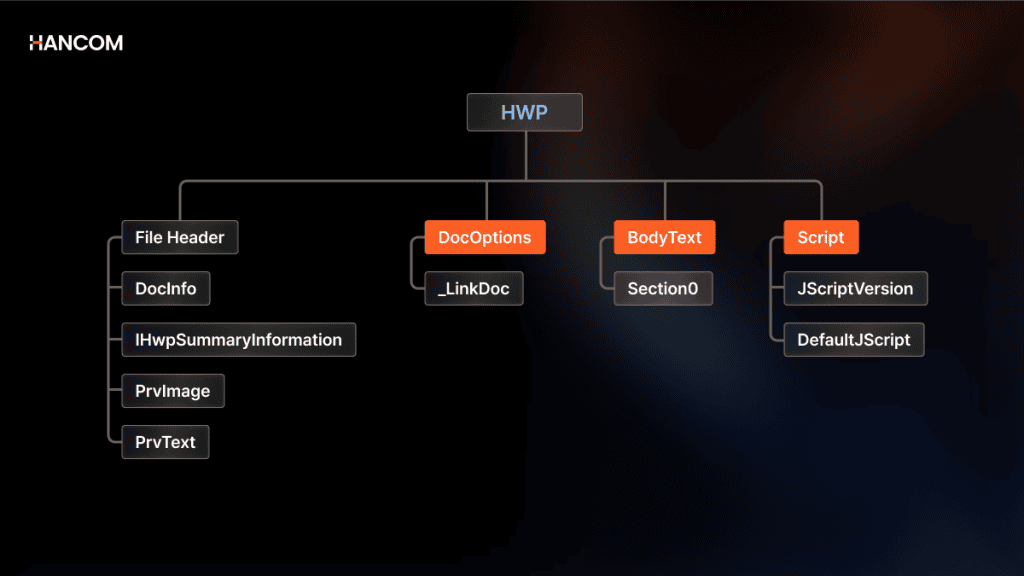
HWP – CFB-based Binary Format Structure
Because the HWP format is designed as a CFB (Compound File Binary Format), featuring an internal hierarchical structure similar to folders, an HWP-specific parser is required.
The inside of the file is divided into Storage and Stream structures; document information is stored in DocInfo, and body content is distributed across BodyText streams.
Therefore, to access body data, the zlib-compressed content must first be decompressed, and then each piece of data must be read in record units. At this point, the Tag ID, Level, and Size information contained in the record header must be accurately interpreted to find the location of the next data.
If the record size or position calculation is off, the subsequent body text, tables, and formatting information may be read incorrectly in a chain reaction. Even though the HWP format structure is public, the reason it is difficult to implement directly is that the internal binary structure and record flow must be precisely interpreted.
Source: Hancom Tech, “HWP Document File Format: Parsing HWP Format via Python (1)“
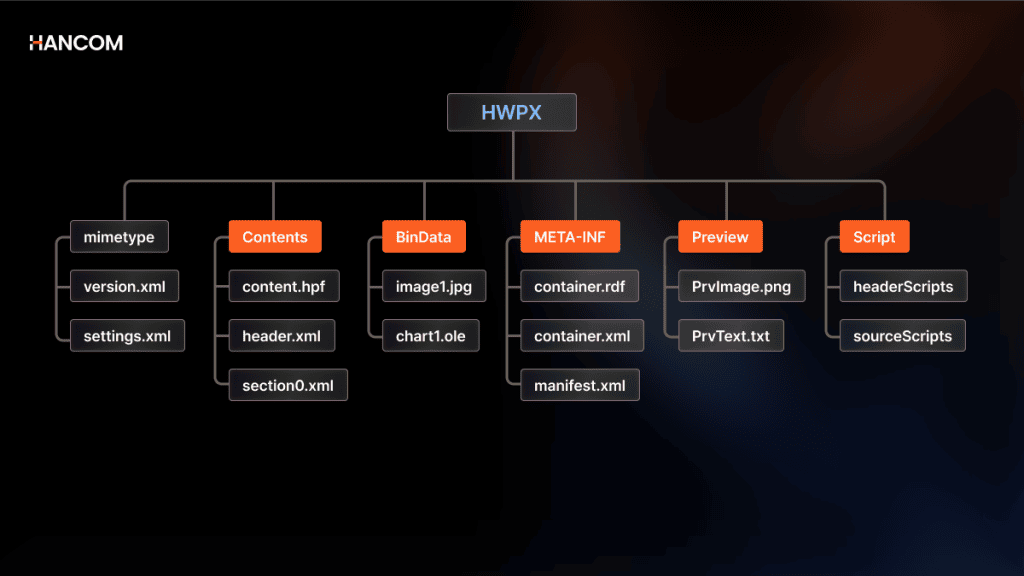
HWPX – Open XML Format Structure Linked with Web Standards
HWPX is an open document format based on the OWPML Open XML structure. Since it is a structure where multiple XML files and resources are bundled together in a ZIP container, it is relatively easier to access text data compared to the method of directly interpreting binary records like in the legacy HWP.
While HWP requires zlib decompression and record-unit parsing depending on the compression flag, HWPX allows for the verification of body text and document information based on the XML structure. For this reason, it is relatively easy to extract text using standard XML parsers or general-purpose development tools, or to connect it to Markdown conversion and unstructured data refinement for AI training.
However, being an XML-based format does not mean the document’s layout and structure are automatically restored. Body data and formatting information are stored across multiple XML files, and information such as character shapes or paragraph shapes must be interpreted by referring to header.xml and other files.
Therefore, to preserve multi-column layouts, cell merge structures within tables, style attributes, and paragraph hierarchies beyond simple text extraction, a separate parsing process that understands the HWPX format structure is necessary. To utilize it for AI training or RAG preprocessing, one must be able to interpret the internal structure of the document along with the text.
Source: Hancom Tech, “HWP Document File Format: Examining the HWPX Format Structure“
Comparison Table of HWP and HWPX Format Structures
| Comparison Item | HWP Format | HWPX Format |
| Format Type | Proprietary Binary Structure (CFB) | Open Web Standard Structure (Open XML) |
| Text Access Difficulty | High (Requires record parsing) | Moderate (XML-based data access possible) |
| Formatting Method | Distributed Storage in Storage and Streams | header.xml Reference Structure |
| Encryption Method | Full Stream Encryption | Individual Encryption per File |
HWPX Transition Trends and Mandate for Public Documents
The reason for transitioning from HWP to HWPX is to make public documents easier to open, analyze, and convert into data that AI can utilize.
Since HWPX is an XML-based open format, it is easier to link with external systems or AI pipelines than the legacy HWP. The fact that the Ministry of the Interior and Safety restricted HWP attachments and mandated HWPX in the On-Nara Document System can be seen as a move to transition public documents into an AI-friendly structure.
Existing HWP documents can also be converted to HWPX for use. Hancom provides a free converter that can transform HWP files into HWPX, allowing for batch conversion of up to 30 files at a time.
Major Open Source Libraries for HWP·HWPX Data Extraction
There are three open-source libraries actually used for HWP·HWPX extraction, all of which were developed based on the official HWP file format documentation released by Hancom.
| Library | Language | Supported Formats | Key Features | Limitations |
| pyhwp | Python | HWP | ODT·HTML·TXT conversion (experimental), hwp5txt CLI | 0.1b15 Beta, releases stagnant since May 2020, HWPX not supported, conversion features in experimental stage |
| hwplib · hwpxlib | Java | HWP · HWPX | Internal structure verification, text extraction, read/write, control manipulation for tables, images, hyperlinks, etc. | HWP format encryption and PDF/HTML/image conversion not supported, table structure restoration and OCR require separate processing |
| hwp.js | JavaScript | HWP | Text extraction, web browser-based file viewing | Distribution-only HWP not supported, HWPX not supported Encryption and PDF conversion not supported |
pyhwp
pyhwp is a Python library frequently mentioned for HWP text extraction. It allows for single-file conversion via the hwp5txt command-line tool, making it useful for personal PC tasks or one-off scripts.
However, the conversion feature is labeled as experimental, and the last PyPI release was 0.1b15 in May 2020. Since there have been no updates since then, its application in production environments requires careful review.
hwplib and hwpxlib
hwplib and hwpxlib are Java libraries released under the Apache 2.0 license by developer neolord0.
They have a wide range of applications, supporting not only text extraction but also the reading, writing, and control of document objects such as tables, images, and hyperlinks.
However, HWP and HWPX are separated into different projects. For encrypted files, hwpxlib only supports HWPX as an extension module, while hwplib does not support encrypted HWP files. Furthermore, they do not support PDF, HTML, or image conversion for the HWP format.
hwp.js
hwp.js is an HWP viewer and parser created in JavaScript by developer hahnlee. It allows HWP files to be displayed in a browser without downloading, so it is used for front-end previews.
However, the developer mentioned in GitHub Issue #7 that hwp.js is an alpha-stage library, describing its HWP format processing coverage at around 20% at that time. Therefore, while it can be referenced for browser-based HWP previews or checking some text, separate verification is needed to apply it to a production RAG pipeline for public documents containing complex formatting and table structures.
(*This article was verified as of June 2026; features may be added or modified in the future.)
In summary, open-source libraries can be useful for verifying the internal structure of HWP·HWPX documents or extracting text.
However, to connect directly to an RAG pipeline, one must go beyond simple text extraction and maintain the row-column relationships of tables, text within images, paragraph hierarchies, and reading order. Since the scope of support varies by library, separate verification is required before applying them to actual business documents.
In particular, because HWP and HWPX have different format structures, it may be difficult to stably process both formats using a single open-source library.
To utilize large volumes of public documents for RAG preprocessing, one must consider not only format-specific parsers but also TSR (Table Structure Recognition) and OCR (Optical Character Recognition) capabilities.
Limitations of HWP·HWPX Open Source Parsers
While open-source libraries are useful for structure verification or text extraction of HWP·HWPX documents, additional review is necessary in environments that process large volumes of public institution documents with many tables and images.
This is especially true if internal documents need to be continuously connected to an RAG pipeline, such as in on-premise LLM or internal LLM deployments, because the quality of the parsing stage directly affects the quality of retrieval and answers.
Loss of Table Structure – Separation of Cell Data and Body Context
Tables in HWP·HWPX documents contain item names, values, conditions, and criteria within row and column relationships. In documents where positional information is critical—such as budget statements, status reports, and support project announcements—the connection between which value belongs to which item must be maintained.
If extraction is focused only on text, the characters within the table may remain, but merged cells, headers, and row-column relationships may not be sufficiently preserved. For example, in a budget statement, even if the terms ‘System Construction,’ ‘2026,’ and ‘300 million KRW’ are all extracted, the meaning may become blurred during the retrieval stage if the 300 million KRW is not linked to the specific project name and year it was allocated to.
Therefore, when dealing with public documents containing many tables, it is advisable not to look only at text extraction results but also to check for TSR and the ability to output cell-unit structured data.
Missing Images and Formulas
Public institution documents often include diagrams, scanned images, official seals, formulas, and charts in addition to body text. Since these elements are not immediately extracted like plain text even if they exist in the file, they may be separated from the body data or omitted depending on the parser’s processing range.
For example, text included in project guide images, figures in captured images of tables, or calculation criteria written in formula format are difficult to reflect properly in RAG preprocessing data without separate OCR or formula processing. Therefore, when handling HWP·HWPX documents with many images and formulas, one should not only check for text extraction but also verify image text recognition, formula processing, and the positional relationship with the body text.
Why HWP·HWPX Parsing Requires Professional Solutions: Hancom Data Loader
🖥️Hancom Data Loader
Hancom Data Loader is a document parsing solution that directly parses original HWP·HWPX documents without PDF conversion and transforms text, tables, images, and paragraph structures into structured data.
Direct Parsing of Original HWP·HWPX
Hancom Data Loader extracts data directly from HWP·HWPX originals based on HWP SDK core technology. It can parse data for footnotes, merged cells, and hierarchical structures that might be lost during PDF conversion while maintaining the original and preserving various layout elements.
TSR – Restoring Table Structure into Data
TSR is a technology that restores the row and column relationships of a table to create structured data.
It recognizes tables without borders, merged cells, and even nested tables, maintaining the connection between table titles and cell data. Since it can distinguish which item a number describes even for the same value, it reduces the possibility of misreading figures in public reports with many budget or statistical tables.
DLA and OCR – Extracting Even Images and Document Hierarchies
DLA (Document Layout Analysis) is a technology that divides a document into areas such as titles, body text, tables, and figures and infers the human reading order, while OCR is a technology that converts text within images into text. Hancom Data Loader’s DLA aligns the body flow in the order a human would read, even in documents with complex structures like 2-column layouts.
By applying OCR together, text included in images can also be extracted, allowing image data that is difficult to process with open-source libraries to be utilized in the RAG pipeline.
*The Image Captioning feature is currently in the PoC stage, and the commercial release schedule will be announced later.
For an RAG pipeline to function properly, the data passed to the AI must be accurate from the outset. Parsing is the first step in this process, and its quality determines the performance of the entire pipeline. Hancom Data Loader supports a wide range of formats, including PDF and OOXML, in addition to HWP and HWPX. You can check it right away without installation through our live demo.
👉 Try the Live Demo: A Document Parser with No Data Loss
👉 Inquire about Hancom Data Loader: The Document Parsing Solution Tailored for Your Business
FAQ: Frequently Asked Questions about HWP·HWPX Data Extraction
Q1. Is there a way to parse HWP or HWPX files directly without converting them to PDF?
Hancom Data Loader extracts data directly from HWP·HWPX originals based on HWP SDK core technology. Because it parses without PDF conversion, it can preserve as much information as possible, such as footnotes, merged cells, and hierarchical structures that might be lost during the conversion process. As a solution developed by Hancom, which holds the original HWP SDK technology, it can process HWP and HWPX in a single pipeline without separate conversion tools.
Q2. How do you solve the problem of mixed-up text reading order during document parsing?
If you use simple text extraction methods without DLA, the characters in the document will come out mixed up, differing from the original order. This occurs frequently in public reports where 2-column layouts or tables and images are mixed, and incorrectly aligned body text can lead to misaligned semantic units during the chunking stage, affecting the quality of RAG answers.
Hancom Data Loader’s DLA divides the document into title, body, table, and figure areas, and then aligns the body flow in the order a human would read, reducing the problem of disrupted reading order.
References
- ZDNet Korea, “Mandatory ‘HWPX’ for Public Documents from the 18th… Transition to AI-Friendly Administrative System,” 2026.05.12
- Financial News, “Mandatory Disclosure of AI Organization, Personnel, and Budget Performance for Public Institutions… Reflected in Management Evaluation,” 2025.10.28
- Lin, “Revolutionizing Retrieval-Augmented Generation with Enhanced PDF Structure Recognition,” arXiv:2401.12599, 2024 https://arxiv.org/abs/2401.12599
- Hancom Tech, “HWP Document File Format: Parsing HWP Format via Python (1),” Woojin Jung
- Hancom Tech, “HWP Document File Format: Examining the HWPX Format Structure”
- neolord0, “hwplib: hwp library for java” GitHub
- neolord0, “hwpxlib: hwpx library for java” GitHub
- hahnlee, “hwp.js: Open source hwp viewer and parser library” GitHub
- pyhwp PyPI Page